
-
Pl
chevron_right
Erlang Solutions: A Live Chiptune Synthesizer in Erlang
news.movim.eu / PlanetJabber • 29 September 2026 • 14 minutes
No sample library — just equations, PCM, and a small OS-specific playback bridge.
Early game consoles had little memory or storage to spare for recorded sound. Their music relied on a small number of voices and a limited vocabulary: simple waveforms, noise, and envelopes. Composers turned those restrictions into instantly recognizable melodies.
Chiptune grew out of these constraints. The term covers a broad family of music and music-making practices rooted in programmable sound chips.
It is often called “8-bit music,” although the label is imprecise: not every chiptune machine was 8-bit, and not every modern track with a retro timbre runs on vintage hardware. The important idea for us is the working method. Instead of asking an audio player to reproduce a recorded instrument, we describe a small signal generator and tell it which frequencies to produce over time. The hardware limitations helped shape the art; today we can choose similar limitations because they are fun.
This project builds a chiptune-inspired synthesizer directly in Erlang. It is not an emulator for a particular console or sound chip. It borrows the useful ingredients—elementary waveforms, noise, short envelopes, and a small set of instruments—and renders them as ordinary digital audio. A bass note is not a WAV file. A kick drum is not a hidden sample. Every instrument is a mathematical function evaluated while the song plays.
The project was inspired in part by the 2020 Erlang Solutions article “The sound of Erlang: How to use Erlang as an instrument”. That article develops sound from first principles, writes raw audio to a file, and plays it with ffplay. We will keep the first-principles spirit but take a different route: multiple simultaneous tracks, several synthesized instruments, chunked rendering, and live playback through the operating system’s audio API.
By the end, you will know how a value such as a4 becomes 440 Hz, how Erlang turns that frequency into signed 16-bit samples, and how those samples reach the speakers.
First, hear the small hand-written demo we will use for the walkthrough. This clip records the synthesizer’s output:
You need Erlang/OTP on PATH, including erl.exe and escript.exe. The playback bridge on Windows uses the powershell.exe and built-in C# compiler available on modern Windows. No FFmpeg, external synthesizer, or audio library is required. Open PowerShell in the repository root and play the small hand-written demo:
.\run-windows.bat demo_song
On macOS, Erlang’s erl and escript commands must be on PATH. The launcher also needs the Apple Command Line Tools to compile the bundled Core Audio bridge. If they are missing, install them with xcode-select --install. Run the equivalent command in Terminal:
./run-macos.sh demo_song
Both launchers compile the application, start a non-interactive Erlang VM, synthesize the song from its Erlang data, and stream it to the default audio output device. They accept any compiled song module with the interface we will examine below.
Before isolating tracks, ask the module what it contains:
On Windows:
.\run-windows.bat demo_song tracks
On macOS:
./run-macos.sh demo_song tracks
The output will be:
[{1, kick}, {2, snare}, {3, closed_hat}, {4, bass}, {5, pad}, {6, lead}]
Now we can listen to the lead by itself or remove the percussion from the mix:
On Windows:
.\run-windows.bat demo_song solo 6
.\run-windows.bat demo_song mute 1,2,3
On macOS:
./run-macos.sh demo_song solo 6
./run-macos.sh demo_song mute 1,2,3
These controls are intentionally small. They are enough to make the synthesizer explorable without turning a blog-sized project into a workstation.
Map of the Project
The playback path is compact enough to follow from beginning to end:
| Location | Responsibility |
|---|---|
src/demo_song.erl | A readable score used for the walkthrough |
src/song_*.erl | Larger song modules generated from MIDI files |
src/music.erl | The small public API: play a song or list its tracks |
src/music_synth.erl | Scheduling, pitch, instruments, mixing, and PCM rendering |
src/music_player.erl | Selects the platform bridge and streams rendered chunks |
priv/wave_out.ps1 | PowerShell/C# bridge to the native Windows waveOut API |
priv/audio_out.c | C bridge to macOS Core Audio’s Audio Queue API |
import/import.py | Optional Standard MIDI File to Erlang module converter |
There are three useful boundaries here. Song modules describe what to play. music_synth calculates what the waveform is. The player and its platform bridge decide how bytes reach an audio device.
A Song Is Erlang Data
A song module exports just two functions. This excerpt shows the tempo and percussion tracks from demo_song:
-module(demo_song).
-export([bpm/0, tracks/0]).

bpm() -> 120.

tracks() ->
  [{kick, lists:seq(0, 30, 2)},
   {snare, lists:seq(1, 31, 2)},
   {closed_hat, [B / 2 || B <- lists:seq(0, 63)]},
   ...].
Try it on Windows or macOS
“`
Each track is {Preset, Events}. A percussion event is simply a beat number. At 120 beats per minute, the kick events above land at beats 0, 2, 4, and so on, while the snare occupies the alternating beats. The closed hat list uses half-beats, which creates the faster pulse running across the demo.
Pitched instruments use {Beat, Duration, Notes}:
{bass, [{0, 0.45, c2}, {1, 0.45, c2}, {2, 0.45, g2}]}

{pad, [{0, 4, {c4, e4, g4}},
       {4, 4, {a3, c4, e4}}]}
“`
Notes may be one note atom or a non-empty tuple. A tuple schedules its notes together, giving us a chord without a second data structure. Both Beat and Duration are measured in beats and can have whole or fractional values.
The generated song_01_slay_the_evil through song_18_infinite_darkness modules follow exactly the same contract. Their scores are much larger, but they are still ordinary data returned by functions.
The public music module keeps callers away from the internal details:
music:play(demo_song).
music:play(demo_song, {solo, 6}).
music:play(demo_song, {mute, [1, 2, 3]}).
music:tracks(demo_song).
“`
Track selection happens before synthesis. music_synth:prepare/2 either keeps all tracks, selects one numbered track, or removes the requested track numbers. It then expands the remaining events into voices: one for each sounding note or percussion hit. A chord creates several voices with the same start time.
Walking Through the Player
music_player.erl is intentionally small. Its two public functions first ask the synthesizer to prepare the whole score, then pass the resulting state to open/1:
play(Song) ->
    open(music_synth:prepare(Song)).

play(Song, Selection) ->
    case music_synth:prepare(Song, Selection) of
        {error, _} = Error -> Error;
        Synth -> open(Synth)
    end.
“`
Once prepared, open/1 selects the platform bridge and starts playback. The bridge requests chunks as its audio buffers become available. Sample indexes determine when notes belong in the score; the audio device paces those samples in real time. We will follow the synthesis steps first, then return to the bridge protocol.
From a Note Name to a Frequency
The note atom a4 becomes MIDI note 69, which corresponds to 440 Hz. In twelve-tone equal temperament, moving one semitone multiplies a frequency by the twelfth root of two. Using A4 as the reference, any MIDI note number Midi can be converted with:
frequency = 440 × 2^((Midi - 69) / 12)
“`
The synthesizer parses atoms such as c4, fs4, and a4, converts the letter, optional s for sharp, and octave into a MIDI number, and applies that formula:
Midi = (Octave + 1) * 12 + Base + Sharp,
440.0 * math:pow(2.0, (Midi - 69) / 12).
“`
For example, c4 becomes MIDI note 60 and approximately 261.63 Hz.
To turn that frequency into audio, we need samples. Sound is changing air pressure; digital audio represents that change as a sequence of numbers. At 44,100 samples per second, sample index SampleI occurs at time T in seconds:
T = SampleI / 44100
“`
A sine wave of frequency F can be sampled with:
sin(2 × pi × F × T)
“`
The result moves between -1 and 1. Repeating the calculation at consecutive values of T produces the waveform. Higher frequencies complete more cycles per second and sound higher.
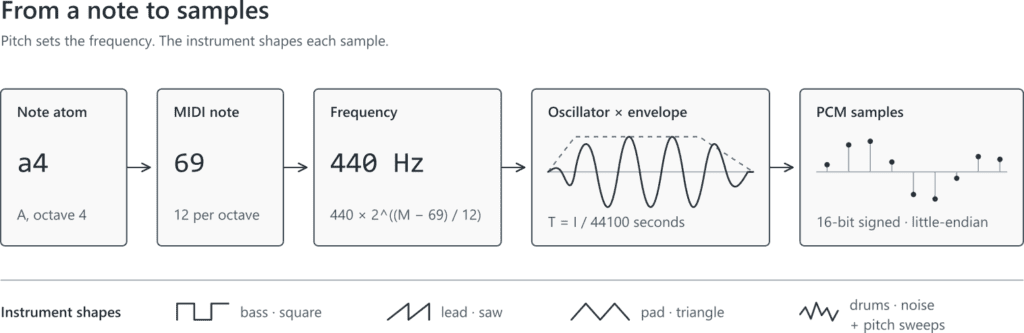
A note becomes audio data. Every point in the final waveform is calculated for its position in time.
Instruments Are Functions
The center of the project is the tone/6 family in music_synth.erl. Its clauses are our instruments. Each receives the time since the voice began, its gate duration, its frequency, and where useful the absolute sample index and a deterministic seed. The gate duration is the time the note is held before its release begins; both it and the elapsed time are measured in seconds here.
The melodic presets start with elementary periodic waveforms:
tone(bass, T, G, F, _, _) ->
  0.32 * square(?PI2 * F * T) * envelope(T, G, 0.005, 0.04);
tone(lead, T, G, F, _, _) ->
  0.22 * saw(?PI2 * F * T) * envelope(T, G, 0.01, 0.12);
tone(pad, T, G, F, _, _) ->
  0.12 * triangle(?PI2 * F * T) * envelope(T, G, 0.18, 0.50).
“`
The ?PI2 macro represents 2 × pi. A square wave flips between two levels and gives the bass a hollow, buzzy sound. A sawtooth ramps and jumps, producing the brighter lead. A triangle wave changes more gently and suits the softer pad.
The piano, organ, and strings presets combine basic waveforms. “Piano” adds sine waves at the fundamental, twice the frequency, and three times the frequency, then applies exponential decay. “Organ” uses a related harmonic mixture without the same decay. Strings combine a saw and a slightly detuned triangle. These are impressions, not physical models of real instruments, and their simplicity is part of the chiptune character.
For percussion, the kick feeds a rapidly falling phase into sin and damps it with exp(-9 × T). The tom uses a gentler downward sweep. The snare adds a short 180 Hz body to deterministic pseudo-random noise; the closed hat is an even shorter burst of noise. The cymbal combines noise with a high square wave. A handful of arithmetic expressions becomes a recognizable drum kit.
One more function keeps notes from clicking abruptly at their edges:
envelope(T, _Gate, Attack, _Release) when T < Attack -> T / Attack;
envelope(T, Gate, _Attack, _Release) when T < Gate -> 1.0;
envelope(T, Gate, _Attack, Release) ->
  max(0.0, 1.0 - (T - Gate) / Release).
“`
This is a compact attack–sustain–release envelope. During attack, amplitude rises from zero. It remains at full level while the note is gated, then falls after release begins. Different attack and release values make the same oscillator feel percussive, plucked, or slow and pad-like.
Scheduling, Mixing, and PCM
Tempo determines when each voice begins. beat_sample/2 converts a beat position to an absolute sample index:
beat_sample(Beat, Bpm) -> round(Beat * 60 * ?RATE / Bpm).
“`
Here ?RATE is 44,100. At 120 BPM, one beat lasts half a second, or 22,050 samples; beat 4 begins at sample 88,200.
A pitched event records three positions: Start, the first sample of the note; Gate, the end of its written duration; and End, the end of its release tail. The renderer advances a sample cursor instead of calling timer:sleep/1 for each note. This keeps note positions fixed even if rendering pauses briefly, although playback still needs a steady supply of audio to avoid gaps.
Multiple tracks do not require separate Erlang processes. prepare_tracks/2 gathers all selected tracks into one list of voices. Notes and chords can overlap because voices whose sample ranges intersect are active together.
Preparation turns events into voice tuples containing the preset, start, gate, end, frequency, and seed. Percussion receives a frequency of zero because its formula does not need the pitch argument. Every preset also has a short tail, allowing its release or decay to continue after the gate closes.
The renderer does not allocate the whole song as one giant list. It works in chunks of 4,410 samples—one tenth of a second at 44.1 kHz:
Count = min(?CHUNK, Total - Pos),
Last = Pos + Count,
Active = [V || V = {_, Start, _, End, _, _} <- Voices,
          Start < Last, End > Pos].
“`
Only voices overlapping the current chunk are considered. For each sample index, the renderer evaluates those voices and sums their amplitudes. The sum is scaled and clamped to the valid range from -1 to 1. Clamping prevents an overflowing mix from wrapping into a radically different value, although a heavily clipped mix can still sound distorted.
Finally, each floating-point sample becomes a signed 16-bit little-endian integer:
pcm(X) -> <<(round(X * 32767)):16/little-signed>>.
“`
The resulting binary is mono linear PCM: 44,100 samples per second, two bytes per sample, 88,200 bytes per second. It contains no file header because we are sending it to a device configured with the matching format, not saving a WAV file.
Playback on Windows and macOS
Erlang can calculate the audio portably, but it still needs an operating-system API to make speakers move. music_player.erl chooses a deliberately small adapter: wave_out.ps1 on Windows or audio_out.c on macOS.
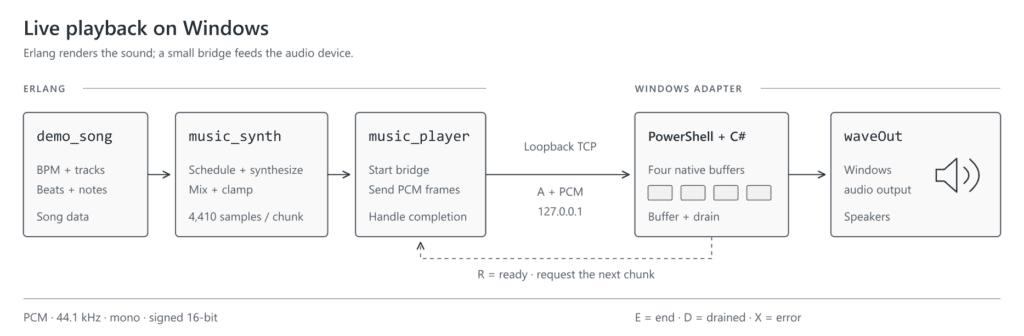
The synthesizer is platform-neutral; this diagram shows the Windows branch of the final bridge.
The player first calls music_synth:prepare/1 or prepare/2. It then checks the operating system and starts a TCP listener bound to 127.0.0.1 on a temporary port. Binding to loopback keeps this private protocol on the local machine.
Next, open_port/2 launches the selected bridge with the temporary port number. Here an Erlang port manages the external process; the PCM itself travels over the loopback TCP socket. The socket uses Erlang’s {packet, 4} mode, so each message receives a four-byte length prefix and arrives as one binary frame.
The PowerShell script uses Add-Type to compile a small embedded C# class. That class connects back to Erlang and opens the default waveform-audio output device through waveOutOpen. Its declared format matches the renderer: PCM, one channel, 44,100 Hz, 16 bits.
On macOS, run-macos.sh compiles the bundled C bridge with Apple Clang into the ignored _build directory. The bridge connects back to Erlang and creates an output queue with Core Audio’s Audio Queue Services. It declares the same mono, 44,100 Hz, signed 16-bit PCM format, so the Erlang renderer sends identical binaries on both systems.
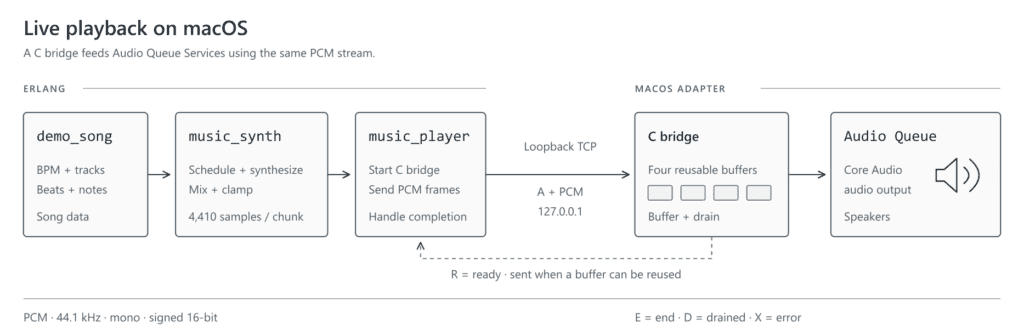
The macOS bridge uses the same PCM format and request protocol as the Windows bridge.
Four native buffers act as playback slots. For every free slot, the bridge sends an R (“ready”) frame. Erlang responds with A followed by one PCM chunk. When the native API makes a buffer reusable, the bridge requests another. This credit-based exchange prevents Erlang from sending audio faster than the fixed buffer pool can accept it.
When the renderer reaches the end, Erlang sends E. The bridge lets all active buffers drain, replies with D, and closes. An X frame carries a bridge error back to Erlang. The protocol is tiny, but it gives the two runtimes explicit flow control and a clean ending. The macOS bridge asks Audio Queue Services to stop non-immediately and waits for its running-state notification before sending D, so buffered audio is not cut off.
The macOS launcher rebuilds the native bridge when its C source changes. The platform boundary remains music_synth:render/1, which returns either {PCM, NextState} or done. A future Linux adapter could consume those same chunks, handle buffering and errors, and drain at the end without changing the score or synthesizer.
MIDI Is an Authoring Tool, Not the Synthesizer
Writing demo_song.erl by hand is useful for learning, but a complete arrangement can contain thousands of note events. import/import.py converts Standard MIDI files into modules with the same bpm/0 and tracks/0 interface.
The larger song_*.erl modules were generated from MIDI files in HydroGene’s free chiptune collection on itch.io, which includes rendered music and its source MIDI files.
Here is the synthesizer playing an imported arrangement, song_01_slay_the_evil. It uses the same instruments as the hand-written demo, with a larger score:
The importer uses only Python’s standard library. It reads MIDI formats 0 and 1, tracks tempo, note-on and note-off events, program changes, chords, and percussion on MIDI channel 10. General MIDI programs are mapped onto the small preset collection rather than reproduced as samples.
You can validate the files in import/input without writing anything:
python3 import/import.py --check
To generate compilable Erlang modules in src, use:
python3 import/import.py --output src
On Windows, use python if that is the name of your Python 3 command.
Existing destinations are skipped unless —overwrite is supplied. Importing is an optional composition workflow; neither Python nor a MIDI parser participates when a song plays. Once generated, a song is simply Erlang source data, and the same mathematical instruments render it.
Equations Become Music
Follow one note and every transformation is visible: a4 becomes MIDI 69, MIDI 69 becomes 440 Hz, 440 Hz drives an oscillator, an envelope shapes its amplitude, voices add together, floats become little-endian integers, and buffered PCM reaches the speakers.
Chiptune began in a world where small sound vocabularies were unavoidable. Recreating that economy in Erlang is a reminder that a musical instrument does not have to be a large framework. Sometimes it can be a few functions, a clock, and 44,100 samples per second.
To hear how much one function matters, change the lead’s saw call to square in music_synth.erl, then run .\run-windows.bat demo_song solo 6 on Windows or ./run-macos.sh demo_song solo 6 on macOS. Keep the notes the same and listen to how the instrument changes. Next, try a longer attack or a shorter release: the score stays familiar while the sound becomes your own.
References and Further Reading
Erlang Solutions, “The sound of Erlang: How to use Erlang as an instrument”, 2020.
Kenneth B. McAlpine, Bits and Pieces: A History of Chiptunes (book), Oxford University Press, 2018.
The post A Live Chiptune Synthesizer in Erlang appeared first on Erlang Solutions.