Here is a new version for slixmpp, the python XMPP library.
The highlight of this release is a fix for a possible man-in-the-middle, so I encourage
everyone to upgrade, or apply a patch against their old version if required.
Thanks to all contributors for this release!
Security
Handling of the error in previous versions would allow attackers to redirect
the stream before STARTTLS. Direct TLS (added in slixmpp 1.10.0 and preferred) is not
affected.
The fixed code does not change the domain for which the connection is for, forcing the
server handling the redirect to present a valid certificate for the domain initially requested.
Additionally, it now checks that the redirect has been sent over a secure connection,
as recommended by the RFC.
If an update to the latest version is not possible, I encourage packagers to apply the simplest patch:
This prevents the untrusted domain from being used as a trust anchor, mitigating the issue.
The issue was found externally by Dickson Wu of CertiK.
Removals / Deprecations
slixmpp.xmlstream.cert has been removed. It was not used anywhere and allows us to drop pyasn1 and pyasn1-modules which means our only mandatory dependency is now aiodns! (and slixmpp can somewhat work without too)
xmpp.register_handler() no longer takes an after parameter. It was unused.
Fixes
Fix a crash where an invalid JID sent by the server could create a traceback.
Interactions between XEP-0004 (Data Forms) and XEP-0377 (Spam Reporting) prevented users from adding multiple reports to the form, which crashed.
XEP-0050 (Ad-Hoc Commands) sessions are cleaned more thoroughly.
XEP-0050 (Ad-Hoc commands) returns the correct error when a session is not found.
XEP-0492 (Chat Notification Settings) had a slight schema definition bug.
Stanza matchers for XEP-0313 (Message Archive Management) were not unregistered after the queries, creating a drag on performance over time.
Features / Improvements
XEP-0363 (HTTP Upload)’s upload_file() can now take an ifrom parameter, to upload from a component.
Performance improvement: the MatchIdSender matcher is now much more efficient.
register_plugins() can now take an exclude set, to register all plugins except a few.
XEP-0444 (Message Reactions)’s send_reactions can now take mfrom and mtype parameters, to choose the origin JID and message type.
XEP-0410 (MUC Self-Ping) now has a targeted event (muc::room@jid::ping_changed) as well as the generic one.
XEP-0513 (Intentional Mention Markup) has been updated to v0.1.1.
XEP-0106 (JID escaping) has been updated to unescape nodes as well.
The "scheduler" example in the docs is no longer empty.
pyo3 has been updated to 0.30.0.
Links
You can find the new release on codeberg, pypi, or the distributions that package it in a short while.
news.movim.eu
/
PlanetJabber
•
1 day ago
• 12 minutes
This post is an excerpt from a longer piece I’ve been working on that aims to
help new folks in my local contra scene get started DJing for contras.
In this introduction I mostly go over the types of contra DJ as I see them, what
new DJs will need to learn to get started, and what software I recommend for the
various tasks that a DJ needs to perform.
Types of Contra DJ
There are many types of contra DJ, and many types of music that work for contra
dances.
If you’re considering learning to DJ, you won’t necessarily need to decide what
type of DJ you’re going to be from the very beginning, and it may be beneficial
to start playing back recorded music and then later move on to looping it, and
then to live mixing.
I break down contra DJs into the following categories:
Recorded Music
The most prominent, and simplest, type of contra DJing happens every day around
the world at dances where there aren’t local bands who play contra tunes, or
where the organizers can’t afford to hire a band.
That is: simply playing recorded music (contra music or otherwise) and dancing
to it.
While this will do in a pinch when the caller or one of the dance organizers is
also the DJ, it has some serious problems.
Most contra music meant for distribution in an album has been cut down to 3 or 4
minutes, not the 8+ minutes expected for a contra dance.
Not to mention the lack of potatoes and frequent non-square tunes.
This will seriously limit the tracks you can play and may make the evening less
fun for your dancers.
Looped Music
If you are calling and expected to bring recorded music of your own, or are a
new DJ just getting started, one way to improve the experience is to pre-prepare
loops in the recorded music.
This way you can toggle loops on or off as the dance progresses to make the
tracks as long as you want, without having to focus on mixing.
The downside to this is that the tracks can be somewhat boring and repetitive
for short tracks that need to be heavily looped to make them long enough for a
full-length contra.
When the caller holds up the hand signal for “three more times” (or whatever
you’ve agreed upon), it can also be hard to meet that requirement and tie in a
nice ending.
Pre-mixed music
Another type of DJing is espoused most prominently by Emily Rush in her famous
“Rushfest”.
Emily plays a mix of pop music and other techno-contra tunes—though this could
be done with traditional contra music as well—but edits them before hand to be
an appropriate length and BPM for dancing.
She also transitions between tunes much as a traditional contra band medley
would do.
If, like Emily, you are the caller as well as the DJ, this may be the perfect
way for you to DJ since it frees you up during the dance to focus on calling,
but also gives you tunes that are always an appropriate length for contra and
that you know will be square.
The downside to this type of dance is that the length of the dance can’t be
adapted by the caller on the fly, so if the dancers are having the absolute best
time singing along to the shortest dance of the evening, or really don’t like a
song that you thought they’d love which is very long, you’re stuck.
Live mixing
The last type of DJing for contras is mixing music live, either with a
controller or a simple mouse and keyboard.
This type of DJing mostly happens at techno-contras and has been made
popular by DJs such as DJ Improper, DJ TacoShel, and
DJ Rynkie.
This is the style of DJing that I do—albeit primarily with regular contra
music, not strictly pop or other modern music—and that I personally think brings
the greatest rewards and the most fun for the dancers!
In this style the music can continue for as long as the caller wants to run the
dance, and is easier on callers who may be used to working with bands since they
can just treat you like they would any other band.
The downside is that if the dance can’t afford to hire bands they may also not
be able to hire a DJ and need to fall back to recorded
music.
Similarly, if you are also the caller, it can be overwhelming to try and focus
on mixing and calling at the same time so pre-mixed or looped music may be a
better solution in this case.
Keep in mind that these categories aren’t mutually exclusive: if you start DJing
you’ll develop your own style that may be a mix of some of the categories I’ve
outlined above, or be something entirely new.
For example you might not like doing full live mixing, but might do your own
pre-recorded mixes with looping to let them run a little longer, or you might
decide to produce all your own music and then live-mix it without using any
existing tunes!
Getting Started
When you DJ for a contra dance you must know a bit about how to DJ, of course.
However, you must also have:
experience as a dancer to know the types of tunes that are likely to appeal to
a dance floor and complement the particular dance selected by the caller,
at least some grasp of the basics of calling to know how to work with the
caller,
and you must know at least as much about the music and its ways as a more
traditional contra dance band.
If you’re starting out with any of these skills, you already have a leg up.
If you’re missing some of them, here are some things you’ll learn as you go:
Experienced DJs
If you’re already an experienced DJ and you want to start DJing for contra
dances it is suggested that you first learn the dance.
Without being a contra dancer yourself, it will be hard to know the particular
qualities of contra music, from old-time reels to Québécois quadrilles.
Once you’re intimately familiar with the various dance moves and musical styles,
you’ll start to feel how the music can change the feel of a particular dance,
where hard drops should hit to emphasize particular parts of the dance, and
generally be better at picking music for the dancers.
Whether you prefer the modern New England style of Great Bear or Kingfisher, or
the old-time, Southern style of Red Mountain or the Lagomorph Quartet, you may
find that you select a tune only to have the dancers and caller look confused,
and eventually have the dance break down.
Not all old-time tunes are suitable for contra, and even tunes meant for dancing
may not necessarily be “square” (ie. they perfectly fit the contra form) which
can cause confusion among dancers and callers alike.
Knowing a bit about the music from the perspective of a caller or contra band
will help here.
The differences between jigs, reels, hornpipes, and marches will be very helpful
knowledge, especially when a caller asks you for a particular type of tune!
Finally, knowing how to communicate with the caller and end the dance (you are
effectively the band, after all!) will be an important skill to have.
Experienced Dancers
If you’re already an experienced contra dancer, congratulations, you have a leg
up!
It can help, however, to have some grasp of DJing in general before you attempt
to DJ for a contra dance.
Having a controller isn’t, strictly speaking, necessary, but even a basic
controller will be immensely helpful for beat matching and bringing in new music
on time when you start performing mixes.
Being able to beat match, understanding harmonic mixing, and knowing a bit about
the structure of music will be extremely helpful.
Experienced Callers
If you’re an experienced caller, it’s to be assumed that you are already an
experienced dancer and are experienced in working with a contra band.
Learning a bit about how a band picks music can help, and of course you’ll want
to know the basics of DJing.
That said, being able to call puts you in the best position to start DJing in my
opinion.
Keep talking to other callers, keep collecting dances, keep taking workshops,
and keep improving your calling.
Your DJing will improve at the same time.
Experienced Musicians
Finally, if you’re an experienced musician, you likely already know a bit about
the dance itself and about how the caller operates.
If you don’t, start there: it will improve your musicianship and make your
instrumental sets much nicer too!
Afterwards, start learning your new instrument: the DJ controller.
You’ll already most of the way there!
When you’re first starting to learn, I recommend avoiding the “influencer” DJ
crowd.
Somehow we’ve wound up in a world where that title conveys some form of gravitas
to a lot of people, but when you swap the word for what they actually do,
suddenly the “propagandist” DJs don’t seem so appealing.
Many of them will encourage you to buy expensive controllers, or immediately
learn how to do a chirp scratch, but a DJ who just plays music on a laptop that
fits the dance will always give the dancers a much better time than one who’s
learned fancy tricks or the more technical side of using a controller but
doesn’t make good musical selections.
The technical skills can come later.
Software
If you’re DJing for contra you’re most likely a digital DJ, that is, you’ll be
using software to play or edit your music.
If not and you prefer to spin vinyl or use CDJs, the rest of this post probably
won’t be much help to you, but if you’d like to teach me I’m all ears!
These recommendations are for the specific software that I use, and I think it’s
generally the best place to start and end, but there are other options out
there and most contra DJing will adapt to almost any software without too much
trouble.
This is by no means a complete list, but it contains what are, in my mind, the
most important pieces of software you’ll need to get started.
Mixing and Playback
The most important piece of software for any digital DJ is going to be what you
use to play music.
For this I recommend Mixxx.
Mixxx is well documented and supports all the basic features you’d expect from
commercial DJ software, but it’s also free, both libre (free as in “free
speech”) and gratis (free as in “free beer”)1.
It will work on most any operating system you happen to be running, including
Linux, Windows2, or MacOS.
The Mixxx 2.5.6 user interface showing the LateNight theme and PaleMoon color scheme
Tagging
For tagging and sorting your media on the filesystem there’s nothing better than
Picard.
It can pull cover art, artist information, and other metadata directly from the
Musicbrainz database, and if your tracks aren’t
listed can be used to add them to the database so that others can benefit from
the metadata you were going to enter anyways.
One of the most under-rated things a DJ can do to improve their craft is keeping
their music library well-tagged and organized! The more duplicates, “Unknown
Track 10122.mp3”, and other confusing library issues a DJ has, the less time
they spend playing good music and making mixes and the more time they spend
trying to find that one track that’s on the tip of their tongue.
Picard can help with this!
The Musicbrainz Picard 3.0 user interface
Recording and Editing
If you plan on using pre-mixed music, producing your own music, or recording
your set regardless of what kind of DJing you’re doing, I recommend the same
software: Ardour.
If you’re on any sort of Linux based operating system, Ardour is likely freely
available in your package manager.
For MacOS or Windows users Ardour can be built yourself if you’re technically
minded, or you can get a convenient installer with a donation of as little as $1
USD.
The Ardour user interface in editing mode
The Ardour user interface in recording mode
If you’re not quite ready for the complexity of a full Digital Audio
Workstation, but still want to record your sets, there is also
Tenacity. It’s multi-track recording capabilities
aren’t nearly as good as Ardour’s, but it is designed to be far easier to use.
I would not recommend it for editing music, however, as it can be more
cumbersome than learning to use Ardour.
Conclusion
Thanks for reading this excerpt!
While the longer post isn’t quite ready, I hope this draft has given potential
contra DJs something to think about.
I’m excited to be publishing it today, Thanksgiving day in the U.S. because it
was a Thanksgiving 19 years ago when I first started this blog (on Blogger, at
the time, before its acquisition by Google).
It’s been nice to have a place to publish my otherwise unpublishable ramblings!
If you’re not familiar with libre software, sometimes called “free
software”, “open source”, or “free and libre open source software” (FLOSS),
etc. the exact definition—which has been disputed by angry nerds since time
immemorial—doesn’t really matter. Suffice it to say that there’s a lot of
cultural and political baggage around each term. The important thing to
know is that bugs can (in theory) be fixed faster, and if you have a feature
that’s missing or some other issue you want fixed it’s possible to get a
real person to talk to and ask about it as opposed to a corporate support
line. Just remember that these real people are likely volunteers, they have
no obligation to help you, especially if you’re a jerk about it and come in
expecting free labor. ↩︎
I would personally encourage you to avoid DJing with Windows. I don’t say
this because of some misguided attempt to argue the benefits of one system
over another, the Mac vs. PC crowd on the internet have argued that half to
death and none of it is worth repeating here (or anywhere else).
I say this because, for DJs, reliability is key and Windows tends to be
slower and more error prone than Linux or MacOS. It also tends to have the
most confusing and complicated setup due to its many audio subsystems and
poor support for audio standards. That said, if Windows is what you’re used
to it’s not worth learning a whole new operating system at the same time
you’re learning to DJ, that will just be confusing. You can always switch
later if you decide to start gigging and reliability becomes a bigger
concern. ↩︎
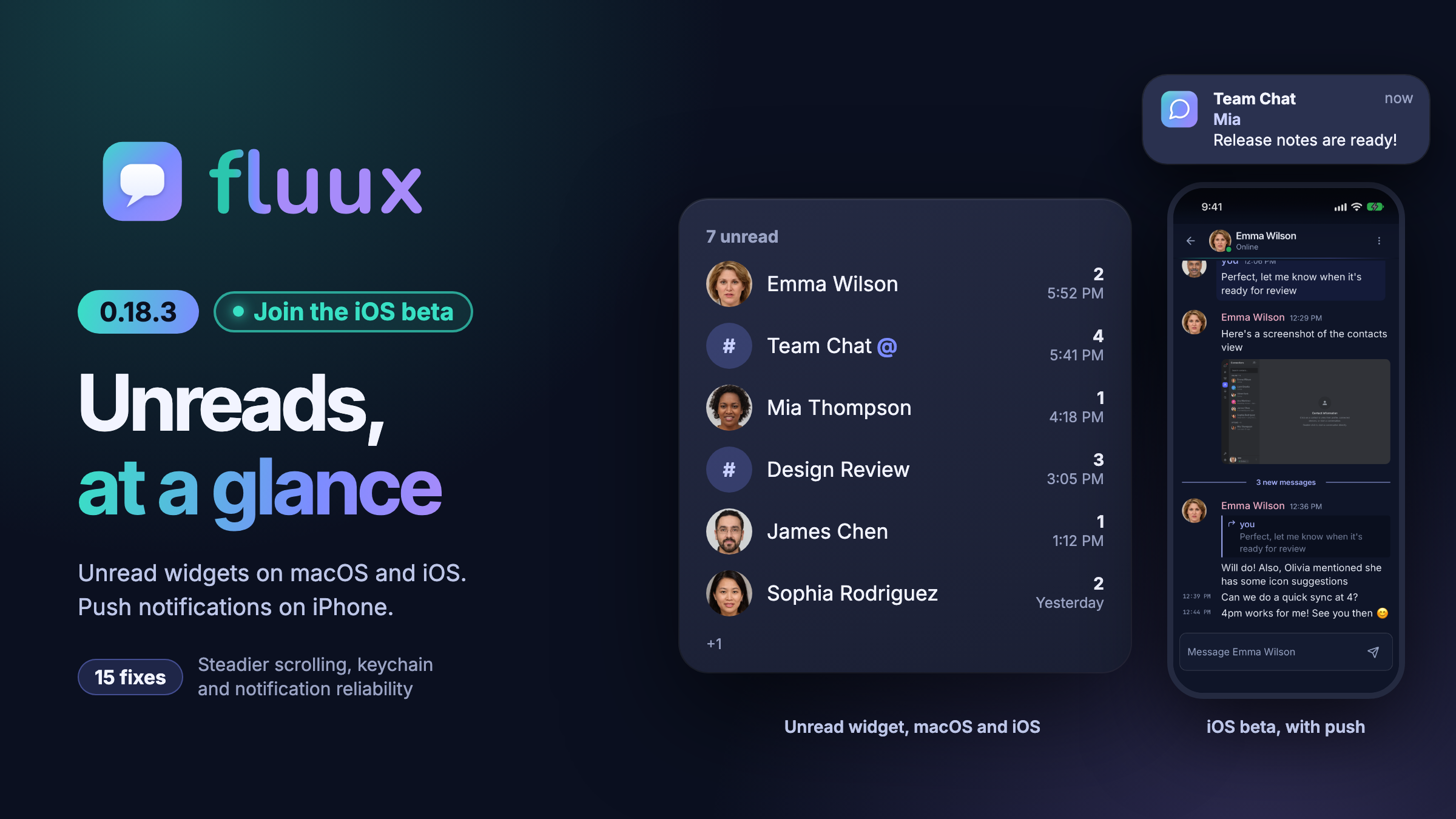
ProcessOne: Fluux Messenger 0.18.3: join the iOS beta, and see your unread conversations at a glance
news.movim.eu
/
PlanetJabber
•
16 November 2026
• 3 minutes
If you are discovering Fluux, it is an open-source XMPP client for teams, communities, and anyone who wants control over their communications. The iPhone and iPad version is experimental, and it is the right moment to shape it: your feedback decides what we fix first.
How to join the iOS beta
Install TestFlight from the App Store, if it is not already on your iPhone. It is Apple&aposs free app for beta testing.
Tap Accept, then Install. Fluux runs on iOS 15 or later; the widget needs iOS 17 or later.
Sign in with your XMPP account and open Fluux. Add the widget from the home screen (touch and hold, then the plus button, then Fluux).
Tell us what you find. In TestFlight, tap Send Beta Feedback, or open an issue on GitHub.
Beta builds can be unstable, and TestFlight builds expire after 90 days, so keep TestFlight installed to receive updates.
What you can try: the iOS widget
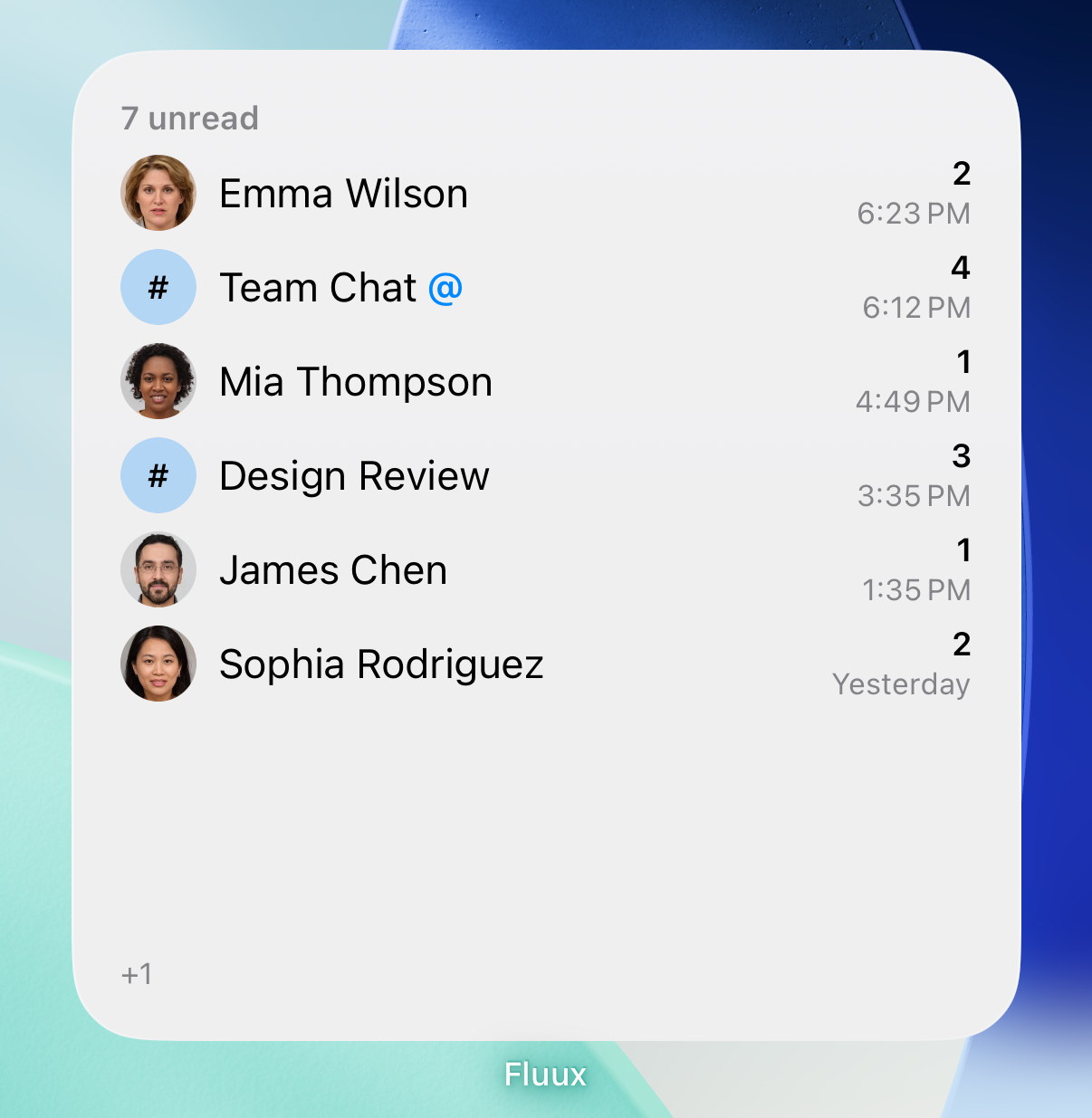
The widget shows your unread conversations on the home screen. The lock screen shows your unread total. Tap a row to open that conversation. Message text is never shown: the widget tells you who is waiting for you, not what they said.
We would especially like to hear whether the widget refreshes when you expect, whether the unread counts match the app, and how it behaves after a restart or a long time without opening Fluux.
Also in 0.18.3
A widget for your Mac desktop
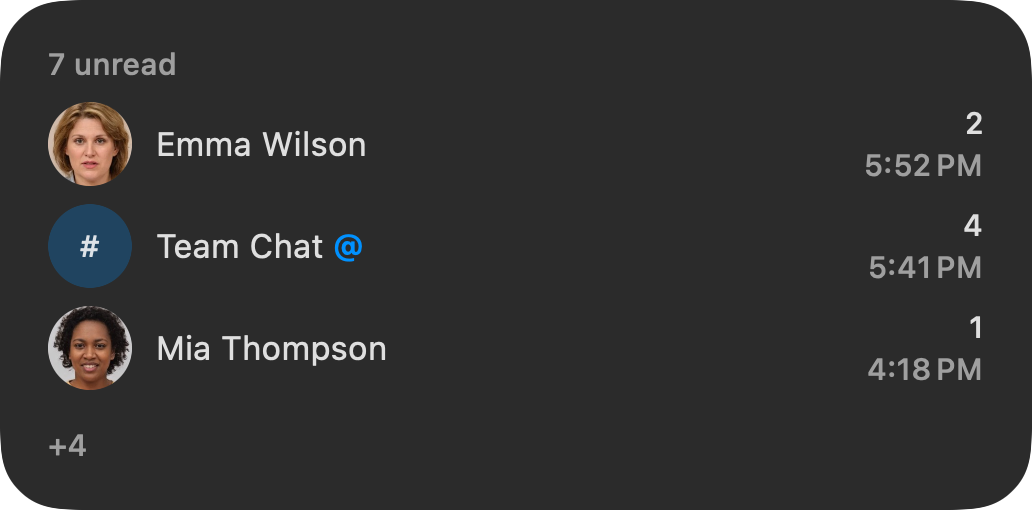
The macOS widget lists your unread conversations with names, avatars, unread counts, mention markers and times. Clicking a row opens that conversation in Fluux. As on iPhone, message text is left out. If Fluux stops updating the saved list, for example because the app is no longer running, the widget marks the old list so you do not mistake it for fresh information.
Notifications that tell you who wrote
On macOS, message notifications now show the sender, along with the room details for room messages, in the way other chat apps do. On iOS, room notifications show the room picture, with the room name first and the sender above the message.
A safer OpenPGP backup
Importing an OpenPGP key file now checks that your server backup matches it. You see a clear status when the backup is not confirmed, and a warning before you replace it. Rotating a key refreshes the backup and gives you a new code.
On macOS, Fluux cleans up old keychain copies without asking for access again, and keeps any copy that differs, so you never lose a secret. A keychain prompt waiting for your answer no longer blocks saving other secrets, such as your encrypted OpenPGP key.
Reading stays where you left it
Scrolling and reading position have kept improving since 0.18.1, and 0.18.3 continues.
Scrolling up in conversations and rooms no longer jumps or skips messages when Fluux corrects its size estimate for older messages.
You can now read back to the very start of a long conversation, past the latest 5,000 messages, without getting stuck. The message you are reading stays put when older messages finish loading, when media finishes loading, and while a conversation grows.
On macOS, reading a conversation or room also clears notifications that arrived before Fluux was last restarted.
news.movim.eu
/
PlanetJabber
•
12 November 2026
• 9 minutes
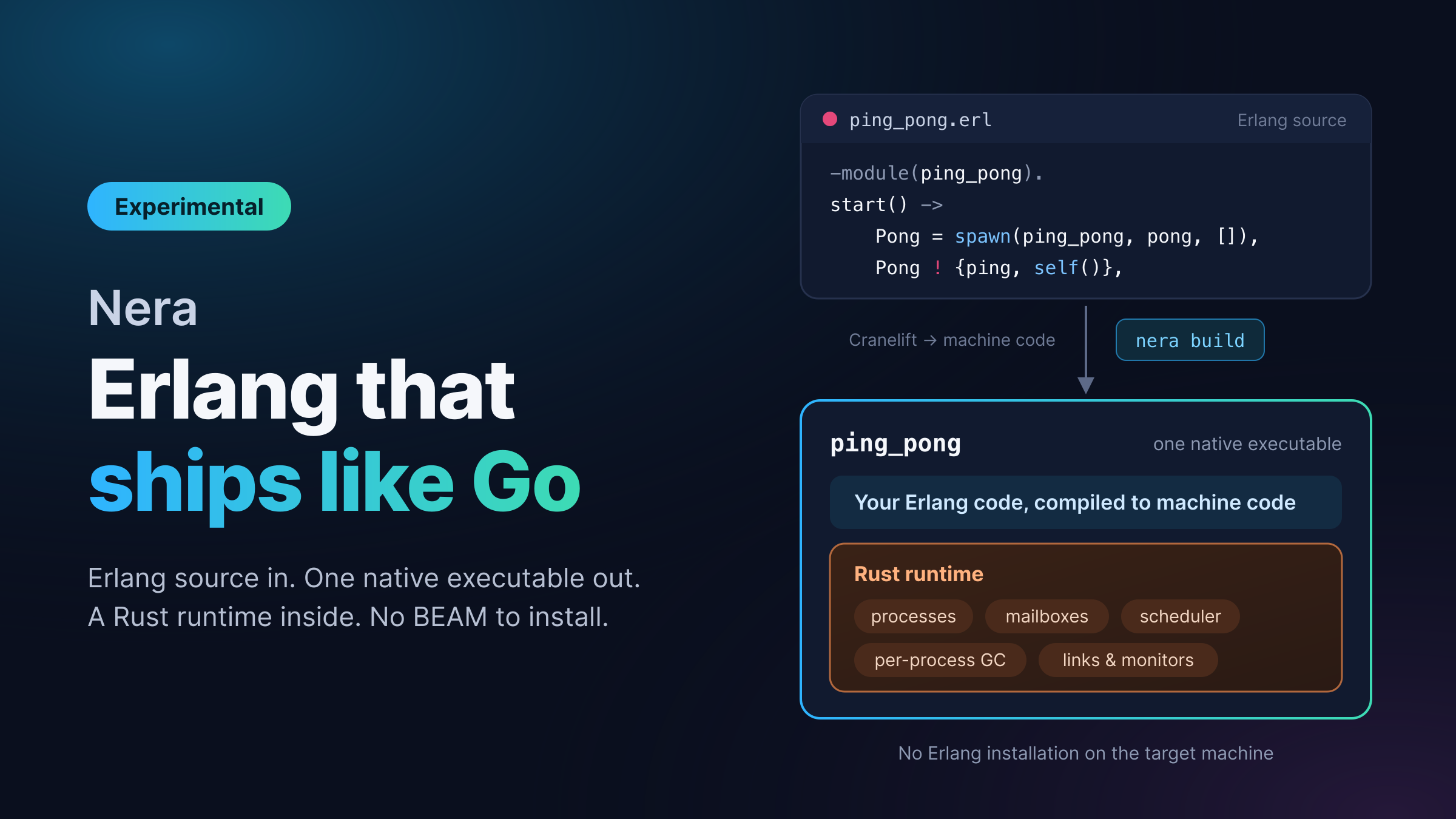
We have been shipping Erlang for more than twenty years. ejabberd runs on the BEAM, and the BEAM has earned its reputation: lightweight processes, isolation, supervision, per-process garbage collection. Few runtimes have aged this well.
And yet, every time we deploy an Erlang program, we deploy two things. The program, and the virtual machine it needs to run.
For a large messaging server, that trade-off is obvious. For a command-line tool, a single-purpose service or an agent at the edge of a network, it is much harder to justify. This is where many teams pick Go. Not because goroutines are a better concurrency model than Erlang processes. Because go build gives them one file they can copy to a machine and run.
What if Erlang could do the same?
That is the question behind Nera, and its repository is now public: github.com/processone/nera. Nera v0.1.0 is out. It is a full release, and it stays experimental until 1.0. This post says exactly what that means.
A native binary with an Erlang runtime inside
Nera is an ahead-of-time compiler for Erlang, written in Rust. It parses .erl source files, lowers them to an intermediate representation, generates machine code with Cranelift, and links the result with Nera&aposs runtime into a single executable.
.erl source → parse → Nera IR → Cranelift → link with the runtime → native executable
There is no bytecode, no interpreter and no JIT. The output is a regular native program, built for one operating system and architecture like any other. The machine that runs it needs no Erlang installation, no release tooling and no erl.
Compiling Erlang to machine code is only half of the problem, though. Erlang programs expect processes, mailboxes and a scheduler. On the BEAM, the virtual machine provides them. With Nera, a runtime written in Rust takes over that part of the VM&aposs job, and it is linked into every program the compiler produces.
That runtime provides:
lightweight Erlang processes, message passing with copy semantics, and selective receive with timeouts;
links, monitors and trapped exits, the building blocks of supervision;
per-process generational garbage collection, so there is no global stop-the-world pause;
a work-stealing scheduler with one thread per CPU core and reduction-based preemption;
timers, ETS tables, persistent_term, counters, atomics, and TCP sockets through gen_tcp.
On top of it, Nera compiles a standard library alongside your code: lists and maps, plus subsets of gen_server, supervisor, application and proc_lib. Their sources are embedded in the compiler binary, so there is nothing else to install.
This is a part of the BEAM, not all of it. Nera does not do hot code upgrades. It does not do distributed Erlang. It has no TLS yet. It is not a drop-in replacement for the BEAM, and it is not trying to be one.
Step by step: two processes playing ping-pong
What does this look like in practice? The repository ships a classic example: two Erlang processes exchanging messages. Here it is, from source to a running native program. Every output below comes from running these commands on macOS arm64 against the public repository.
1. Build the compiler. Nera needs Rust 1.99.0, pinned in the repository, and a C linker:
-o names the output file and -e the entry point, the function the program starts with. The compiler prints one line naming the runtime library it links, and writes ping_pong in the current folder.
4. Look at what it produced.
file ping_pong
otool -L ping_pong
ping_pong: Mach-O 64-bit executable arm64
ping_pong:
	/usr/lib/libSystem.B.dylib (compatibility version 1.0.0, current version 1356.0.0)
A regular macOS executable, whose only dynamic dependency is the system library. No BEAM, no erl, no release directory next to it.
5. Run it.
./ping_pong
Pong received ping
Ping received pong (10 remaining)
Pong received ping
Ping received pong (9 remaining)
Pong received ping
Ping received pong (8 remaining)
Pong received ping
Ping received pong (7 remaining)
Pong received ping
Ping received pong (6 remaining)
Pong received ping
Ping received pong (5 remaining)
Pong received ping
Ping received pong (4 remaining)
Pong received ping
Ping received pong (3 remaining)
Pong received ping
Ping received pong (2 remaining)
Pong received ping
Ping received pong (1 remaining)
Ping done
The program exits with status 0 when start/0 returns. The same source, compiled with erlc and run on OTP 29, prints the same 21 lines.
The two processes are scheduled by Nera&aposs runtime, which starts one scheduler thread per CPU core by default. Setting NERA_SCHEDULERS=1 when you launch the program runs it on a single thread, which is handy for reproducible tests.
More than a compiler
A compiler is only usable with the tools around it. Nera manages dependencies from hex.pm, git or a local path through a nera.toml file, and it can also build against the dependencies rebar3 has already fetched. It has a test runner (nera test), a formatter (nera fmt), and an LSP server with a VS Code extension and a JetBrains plugin, both attached to the release (the JetBrains plugin needs a commercial IDE, version 2025.3 or later). An Emacs integration is in the repository.
The checker is useful even if you never deploy a Nera binary. nera check runs the whole front end, from parsing and preprocessing to lowering and validation, without generating code. It understands standard OTP project layouts and rebar3 dependency directories, so you can point it at an existing project and get diagnostics in your editor while you keep building and deploying with the standard Erlang/OTP toolchain. (Its warnings can still differ from erlc&aposs. We want to hear about every false one.)
What runs today
A ping-pong between two processes proves very little on its own. So we test Nera against real libraries.
The most complete result so far is Cowlib, the protocol library behind the Cowboy HTTP server. The repository includes a small project, examples/cowlib_demo, that fetches Cowlib 2.22.0 from hex.pm and builds it natively. With target/release on your PATH:
cd examples/cowlib_demo
nera deps get
nera build
./cowlib_demo
It makes 85 calls across all 25 Cowlib modules: cookies, dates, URIs, HTTP headers, HTTP/2 and HTTP/3 framing, HPACK and QPACK, multipart, WebSocket masking. All 85 return without an exception. Run against the same code on OTP 29, 75 output lines are byte-identical. Eight hold the same values with a different map order or an atom printed without quotes. Two differ only in byte order, because Nera orders atom keys differently from OTP; they are equal once sorted. Cowlib&aposs upstream cookie and date suites ran natively on an earlier version (2.20.0); we have not rerun them on 2.22.0.
Thoas 1.2.1, a JSON library, passes its recorded checks on Nera, including all 318 cases of JSONTestSuite. And on macOS arm64, Nera&aposs main branch passes its local gate with 2,118 Rust workspace tests and 450 Erlang tests.
What does not work yet
Experimental is not a polite word for "almost done". Here is where Nera stands, taken from the known limits page we keep in the repository and revise with every release:
Platforms. Nera is developed on macOS arm64. Linux x86-64 is built and tested natively in CI, and the release job compiles and runs a program from the installed archive. The macOS x86-64 and Linux arm64 archives are cross-built and have never been executed. Windows is not supported: the compiler does not link there and there is no archive.
Cowboy does not run yet. Nera lowers all 68 modules of Cowboy 2.20.0, Ranch 1.8.1 and Cowlib 2.21.0, but they still call about 70 OTP functions that Nera does not implement. A native "hello world" server links, then never opens a socket.
No TLS, no distribution, no hot code upgrade. The ssl module is not implemented, Nera runs single-node programs, and code cannot be reloaded at run time.
Partial OTP. Supervisors honour only one_for_one. Some ETS and binary functions are missing. After a gen_server:call times out, the late reply still arrives in the caller&aposs mailbox.
Known wrong results. Some operations on terms nested thousands of levels deep crash on the native stack, where the BEAM handles them. A few printing details differ.
Performance. The benchmark figures in the README are historical, measured on one Apple M4 Pro, and have not been revalidated. We will not quote them as results until we rerun them.
In short: do not use Nera for production services yet. There is no compatibility promise between releases, and wrong results are still being found. If an output matters, compare it with the BEAM.
Why we are building it
Let me be clear about one thing first. We are not moving ejabberd to Nera. ejabberd relies on hot code loading, distribution, Mnesia and native extensions. It belongs on the BEAM, and it stays there.
What interests us is everything around it.
Erlang&aposs ideas are worth more than any single runtime: isolated processes, message passing, supervision, and letting a failing process crash. Today, using them means accepting the BEAM&aposs deployment model. For a lot of software, that is the right deal. For a lot of other software, it is the reason Erlang was never considered in the first place.
The first demonstrator on our roadmap makes this concrete for messaging. It is an external XMPP component, connected to an existing server such as ejabberd through XEP-0114, that routes alerts with Erlang rules and runs as a native executable on a host without Erlang. The same plan adds compile-time checking of the contracts in its Erlang core. Both are planned work, not results, and the roadmap lists the gates each must pass.
What comes next
Nera v0.1.0 is out. Later experimental tags will be named vX.Y.Z-experimental and published as GitHub prereleases. Next, the next milestone is Cowboy over plain HTTP, then Cowboy with TLS.
Those are milestones, not dates.
Try it, and tell us what breaks
Download the archive for your platform from the v0.1.0 release page, or build from source as shown above. The ping-pong steps above are the shortest way in. From there, the walkthroughs for Erlang developers go through processes, an OTP-style server, a real JSON library and the editor tooling. Read the known limits before porting anything larger.
When Nera gives a different result from the BEAM, the most useful report is a single .erl file with the output of both. Open an issue on GitHub. Nera is released under the Apache 2.0 license.
Erlang&aposs ideas deserve to run in more places than the BEAM can reach. Nera is our bet that they can, but it is an early attempt.
Erlang Solutions: Can Agentic AI Find the Security Vulnerabilities Other Tests Miss?
news.movim.eu
/
PlanetJabber
•
8 October 2026
• 6 minutes
Security teams are good at finding problems. The difficult part is finding the right problems across a growing codebase, a changing application and the connections between them. A scanner can flag a known pattern quickly. A skilled tester can follow a complicated line of enquiry. Neither has unlimited time, and there will always be a question nobody thought to ask.
Could AI agents take on more of that investigative work? I think the answer is yes, provided we are precise about what “find” means. Agents can produce leads, test assumptions and uncover issues that established checks have missed. A security vulnerability, though, has to survive examination in the context of the real system.
That distinction matters more as agents become available to both defenders and attackers. A familiar weakness can become more relevant when agents have the time to find it, test it and follow where it leads. Defenders have a good reason to look again at parts of their systems that were too laborious to examine thoroughly.
What might agents see differently?
Think about the code paths that work perfectly well in normal use but behave differently with a surprising input or an unusual amount of data. Fuzzing (testing software with unexpected or malformed inputs) helps explore these cases; agents can then read the surrounding code, try a more specific hypothesis and keep working through leads that would consume too much of an engineer’s day if checked one by one.
Some issues only become apparent when you understand how the application is used. A finding may look harmless in isolation until you establish who controls the input, which permissions are involved or what the application is meant to prevent. Agents can explore a sequence of actions and check how the application responds at each step, which may reveal a problem that would be hard to spot from an isolated code warning.
There is also the possibility that one weakness opens the way to another. A low-priority issue could expose useful information; a forgotten endpoint might give access to a service assumed to be isolated. Agents can follow a discovery into the next step, although its account of that path still needs to be checked. The full route through a system may matter more than the severity of any one weakness in it.
I would be careful about grouping all of this under one claim that “AI finds what traditional testing misses”. Code analysis tools, fuzzing tools, formal verification and agents conducting a permitted penetration test are doing different jobs. Their findings have different levels of evidence. Formal verification is also starting to gain traction, with code agents proving useful for generating the specifications it requires. The useful question is where agents give the team another line of enquiry and how that enquiry will be validated.
What we found in a mature codebase
We have seen one version of this in our own work. Lukas Backström, a senior developer at Erlang Solutions and a member of the Ericsson Erlang/OTP core development team, built a custom workflow using Claude Code to examine the Erlang/OTP repository for security vulnerabilities, bugs and performance issues.
This codebase already receives human review, regular automated functional and performance testing, and vulnerability scanning. Even so, agents surfaced cases where expensive encoding or decoding could be performed on untrusted data that was very large or unbounded, creating a possible denial-of-service risk. The operation itself was not mysterious. Finding the relevant combination of input and behaviour across a large repository was the challenge.
Our published case study reports approximately 20 previously unknown, potentially severe security vulnerabilities, alongside around 400 critical or high findings and roughly 4,000 findings overall, most of them low-severity bugs. These are reported findings from the investigation, not a claim that thousands of confirmed security vulnerabilities were waiting to be fixed. And, this is one of the world’s most thoroughly tested code bases.
The project gives us evidence for a particular point: agents helped investigate parts of an extensively tested codebase that would have been difficult to cover manually. It does not prove that agents will outperform every scanner or security team. The details of the task and the review process made the result useful.
The part that takes judgement
Lukas gave agents a verification mode, including access to a Docker container to check findings and rank their severity and confidence. He also found that a fresh context and a focused second look at an issue helped expose false positives. That separate work took substantial compute, and the agents still sometimes returned a high-confidence finding that was wrong. It could also mistake a bug for a security issue because it misunderstood the threat model.
An engineer has to ask whether an attacker can reach the relevant code, what input they control, what limits exist elsewhere and what happens in a real deployment. A persuasive explanation from an agent is a reason to investigate, not evidence that every assumption is true.
There is a second challenge once agents start finding more faults. Most teams do not need a larger pile of unverified tickets. They need to know which findings are real and which ones deserve attention first. Every result takes time to assess, and asking agents to assess it again can add to the compute cost. Finding more vulnerabilities only helps if the team has enough context to act on what matters.
The investigative agents must also be secure in its own right. It may read code, retrieve documents and run tools, so its permissions and execution environment deserve scrutiny. Untrusted material could contain instructions intended to redirect its behaviour. The team needs to decide what the agents can access and do before giving it sensitive systems to examine.
Where I would start
I would treat an agentic investigation as an experiment with a clear question, rather than asking agents to “find everything” and judging success by the length of its report:
Choose the gap. Is the team trying to explore unusual code paths, test a business workflow or understand whether separate weaknesses can form an attack path? Set the scope and define what would make a finding meaningful.
Require a trail of evidence. Ask the agents to record what it examined, the assumptions it made and what happened when it tried to verify a concern. Give engineers something they can reproduce.
Review the results against the threat model. Check reachability, exploitability and impact before assigning severity. Give the agents limited access and keep a record of its actions during the investigation.
Measure the whole exercise. Count confirmed issues and the time spent validating them, as well as compute and findings rejected. Compare what the agents found with what existing tests had already revealed.
To conclude
So, can agentic AI find security vulnerabilities other tests miss? Yes, it can uncover leads that existing checks have not surfaced, particularly when an issue takes sustained investigation to find. Our Erlang/OTP work showed that in a codebase with established reviews, automated tests and vulnerability scanning. It was not a test-by-test comparison, so we cannot say which individual check missed each issue.
Finding a lead is only part of the answer. An experienced engineer still needs to establish whether it is a genuine security vulnerability and what should be fixed. The opportunity is to investigate more of the questions a team has never had the time to pursue, then give those findings the scrutiny they deserve.
This release contains fixes for those security issues:
Unauthenticated Remote Code Execution on ejabberd (reported by Gia Bui) when:
ejabberd versions is at least 25.10
BOSH is enabled on any port
S2S is enabled
mod_adhoc_api is loaded
outbound connectivity from ejabberd on ports epmd (default 4369), s2s (default 5269) and Erlang distribution port (dynamically assigned, typically in the range 49152-65535 unless FIREWALL_WINDOW is set in ejabberdctl.cfg).
DoS attack on 16.12+ versions if BOSH is enabled on any port.
Cross-Tenant MUC, Roster and Shared-Roster unauthorized access (reported by Hoang Gia).
Fixed the ordering of some XML child elements
There was a reference-ordering problem in the fast_xml generator, it generated XML encoders that could reorder child elements in a different order from the one declared in the codec specification. From now, the order is the one declared in the codec specification. See details in https://github.com/processone/fast_xml/pull/53
Additionally there was an incorrect sasl2_continue declaration order in the xmpp erlang library: it declared "additional-data, text, tasks". Now it follows the ordering defined in XEP-0388 schema: "additional-data, tasks, text". See details in https://github.com/processone/xmpp/pull/112
New option for CAPTCHA POW
New toplevel option captcha_pow adds a SHA-256 hashcash challenge as described in XEP-0158 in the CAPTCHA form, alongside the image challenge or on its own.
Unlike the image challenge, this does not require setting the option captcha_cmd.
This option is used only by mod_register when registering a new account using In-Band Registration, not in MUC rooms or in mod_register_web. It is disabled by default.
many options modules, for example access_admin option in mod_muc
Consequently, that admin account can administer all of ejabberd: all the global features, all the modules, in all the vhosts... For now let&aposs call it a "global admin".
If you have several vhosts, you can allow specific accounts to administer only specific vhosts. Let&aposs call them "vhost-admins". In this example admin1@localhost can execute commands on all vhosts. Additionally, localhost has a vhost-admin, second has two vhosts-admins, and third has a vhost-admin:
If a vhost-admin tries to execute an API command directed to a vhost he does not administer, or a global command (that has no host argument, and affects all ejabberd), they are rejected:
$ curl --basic --user hostadmin@third:somepass -k \
  &aposhttps://localhost:5443/api/status_num_host?host=third&status=dnd&apos
{"code":32,
 "message":"AccessRules: Account does not have the right to perform the operation.",
 "status":"error"}

$ curl --basic --user hostadmin@third:somepass -k \
  &aposhttps://localhost:5443/api/stats?name=registeredusers&apos
{"code":32,
 "message":"AccessRules: Account does not have the right to perform the operation.",
 "status":"error"}
ChangeLog
Security fixes
Unauthenticated Remote Code Execution on ejabberd
DoS attack on BOSH
Cross-Tenant MUC, Roster and Shared-Roster unauthorized access
Core
Add force value to auth_external_user_exists_check option
ALTER TABLE push_gate CHANGE COLUMN user username text NOT NULL;
CREATE INDEX i_push_gate_username_server_host USING BTREE ON `push_gate`(username(191), server_host(191));
Otherwise:
ALTER TABLE push_gate RENAME COLUMN user TO username;
CREATE INDEX i_push_gate_username USING BTREE ON `push_gate`(username(191));
PgSql
When using multihost schema:
ALTER TABLE push_gate RENAME COLUMN "user" TO "username";
CREATE INDEX i_push_gate_token_server_host ON "push_gate" USING btree ("username", "server_host");
Otherwise:
ALTER TABLE push_gate RENAME COLUMN "user" TO "username";
CREATE INDEX i_push_gate_token ON "push_gate" USING btree ("username");
ejabberd 26.09 download & feedback
As usual, the release is tagged in the Git source code repository on GitHub.
Erlang Solutions: A Live Chiptune Synthesizer in Erlang
news.movim.eu
/
PlanetJabber
•
29 September 2026
• 14 minutes
No sample library — just equations, PCM, and a small OS-specific playback bridge.
Early game consoles had little memory or storage to spare for recorded sound. Their music relied on a small number of voices and a limited vocabulary: simple waveforms, noise, and envelopes. Composers turned those restrictions into instantly recognizable melodies.
Chiptune grew out of these constraints. The term covers a broad family of music and music-making practices rooted in programmable sound chips.
It is often called “8-bit music,” although the label is imprecise: not every chiptune machine was 8-bit, and not every modern track with a retro timbre runs on vintage hardware. The important idea for us is the working method. Instead of asking an audio player to reproduce a recorded instrument, we describe a small signal generator and tell it which frequencies to produce over time. The hardware limitations helped shape the art; today we can choose similar limitations because they are fun.
This project builds a chiptune-inspired synthesizer directly in Erlang. It is not an emulator for a particular console or sound chip. It borrows the useful ingredients—elementary waveforms, noise, short envelopes, and a small set of instruments—and renders them as ordinary digital audio. A bass note is not a WAV file. A kick drum is not a hidden sample. Every instrument is a mathematical function evaluated while the song plays.
The project was inspired in part by the 2020 Erlang Solutions article “The sound of Erlang: How to use Erlang as an instrument”. That article develops sound from first principles, writes raw audio to a file, and plays it with ffplay. We will keep the first-principles spirit but take a different route: multiple simultaneous tracks, several synthesized instruments, chunked rendering, and live playback through the operating system’s audio API.
By the end, you will know how a value such as a4 becomes 440 Hz, how Erlang turns that frequency into signed 16-bit samples, and how those samples reach the speakers.
First, hear the small hand-written demo we will use for the walkthrough. This clip records the synthesizer’s output:
You need Erlang/OTP on PATH, including erl.exe and escript.exe. The playback bridge on Windows uses the powershell.exe and built-in C# compiler available on modern Windows. No FFmpeg, external synthesizer, or audio library is required. Open PowerShell in the repository root and play the small hand-written demo:
.\run-windows.bat demo_song
On macOS, Erlang’s erl and escript commands must be on PATH. The launcher also needs the Apple Command Line Tools to compile the bundled Core Audio bridge. If they are missing, install them with xcode-select --install. Run the equivalent command in Terminal:
./run-macos.sh demo_song
Both launchers compile the application, start a non-interactive Erlang VM, synthesize the song from its Erlang data, and stream it to the default audio output device. They accept any compiled song module with the interface we will examine below.
Before isolating tracks, ask the module what it contains:
Optional Standard MIDI File to Erlang module converter
There are three useful boundaries here. Song modules describe what to play. music_synth calculates what the waveform is. The player and its platform bridge decide how bytes reach an audio device.
A Song Is Erlang Data
A song module exports just two functions. This excerpt shows the tempo and percussion tracks from demo_song:
Each track is {Preset, Events}. A percussion event is simply a beat number. At 120 beats per minute, the kick events above land at beats 0, 2, 4, and so on, while the snare occupies the alternating beats. The closed hat list uses half-beats, which creates the faster pulse running across the demo.
Notes may be one note atom or a non-empty tuple. A tuple schedules its notes together, giving us a chord without a second data structure. Both Beat and Duration are measured in beats and can have whole or fractional values.
The generated song_01_slay_the_evil through song_18_infinite_darkness modules follow exactly the same contract. Their scores are much larger, but they are still ordinary data returned by functions.
The publicmusic module keeps callers away from the internal details:
Track selection happens before synthesis. music_synth:prepare/2 either keeps all tracks, selects one numbered track, or removes the requested track numbers. It then expands the remaining events into voices: one for each sounding note or percussion hit. A chord creates several voices with the same start time.
Walking Through the Player
music_player.erl is intentionally small. Its two public functions first ask the synthesizer to prepare the whole score, then pass the resulting state to open/1:
play(Song) ->
    open(music_synth:prepare(Song)).

play(Song, Selection) ->
    case music_synth:prepare(Song, Selection) of
        {error, _} = Error -> Error;
        Synth -> open(Synth)
    end.
“`
Once prepared, open/1 selects the platform bridge and starts playback. The bridge requests chunks as its audio buffers become available. Sample indexes determine when notes belong in the score; the audio device paces those samples in real time. We will follow the synthesis steps first, then return to the bridge protocol.
From a Note Name to a Frequency
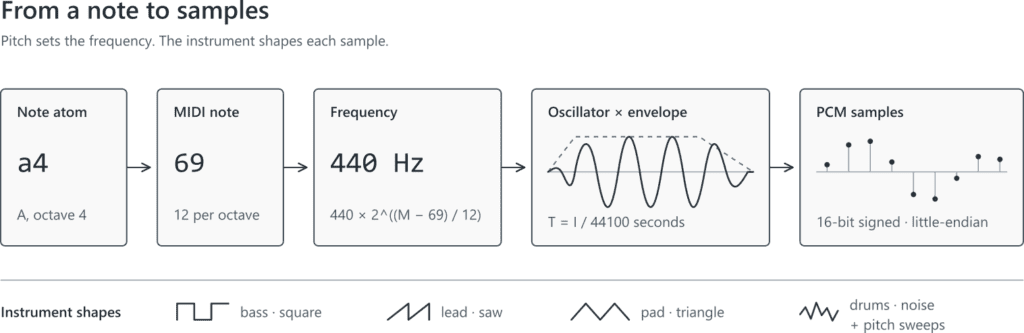
The note atom a4 becomes MIDI note 69, which corresponds to 440 Hz. In twelve-tone equal temperament, moving one semitone multiplies a frequency by the twelfth root of two. Using A4 as the reference, any MIDI note number Midi can be converted with:
frequency = 440 × 2^((Midi - 69) / 12)
“`
The synthesizer parses atoms such as c4, fs4, and a4, converts the letter, optional s for sharp, and octave into a MIDI number, and applies that formula:
For example, c4 becomes MIDI note 60 and approximately 261.63 Hz.
To turn that frequency into audio, we need samples. Sound is changing air pressure; digital audio represents that change as a sequence of numbers. At 44,100 samples per second, sample index SampleI occurs at time T in seconds:
T = SampleI / 44100
“`
A sine wave of frequency F can be sampled with:
sin(2 × pi × F × T)
“`
The result moves between -1 and 1. Repeating the calculation at consecutive values of T produces the waveform. Higher frequencies complete more cycles per second and sound higher.
A note becomes audio data. Every point in the final waveform is calculated for its position in time.
Instruments Are Functions
The center of the project is the tone/6 family in music_synth.erl. Its clauses are our instruments. Each receives the time since the voice began, its gate duration, its frequency, and where useful the absolute sample index and a deterministic seed. The gate duration is the time the note is held before its release begins; both it and the elapsed time are measured in seconds here.
The melodic presets start with elementary periodic waveforms:
The ?PI2 macro represents 2 × pi. A square wave flips between two levels and gives the bass a hollow, buzzy sound. A sawtooth ramps and jumps, producing the brighter lead. A triangle wave changes more gently and suits the softer pad.
The piano, organ, and strings presets combine basic waveforms. “Piano” adds sine waves at the fundamental, twice the frequency, and three times the frequency, then applies exponential decay. “Organ” uses a related harmonic mixture without the same decay. Strings combine a saw and a slightly detuned triangle. These are impressions, not physical models of real instruments, and their simplicity is part of the chiptune character.
For percussion, the kick feeds a rapidly falling phase into sin and damps it with exp(-9 × T). The tom uses a gentler downward sweep. The snare adds a short 180 Hz body to deterministic pseudo-random noise; the closed hat is an even shorter burst of noise. The cymbal combines noise with a high square wave. A handful of arithmetic expressions becomes a recognizable drum kit.
One more function keeps notes from clicking abruptly at their edges:
envelope(T, _Gate, Attack, _Release) when T < Attack -> T / Attack;
envelope(T, Gate, _Attack, _Release) when T < Gate -> 1.0;
envelope(T, Gate, _Attack, Release) ->
  max(0.0, 1.0 - (T - Gate) / Release).
“`
This is a compact attack–sustain–release envelope. During attack, amplitude rises from zero. It remains at full level while the note is gated, then falls after release begins. Different attack and release values make the same oscillator feel percussive, plucked, or slow and pad-like.
Scheduling, Mixing, and PCM
Tempo determines when each voice begins. beat_sample/2 converts a beat position to an absolute sample index:
Here ?RATE is 44,100. At 120 BPM, one beat lasts half a second, or 22,050 samples; beat 4 begins at sample 88,200.
A pitched event records three positions: Start, the first sample of the note; Gate, the end of its written duration; and End, the end of its release tail. The renderer advances a sample cursor instead of calling timer:sleep/1 for each note. This keeps note positions fixed even if rendering pauses briefly, although playback still needs a steady supply of audio to avoid gaps.
Multiple tracks do not require separate Erlang processes. prepare_tracks/2 gathers all selected tracks into one list of voices. Notes and chords can overlap because voices whose sample ranges intersect are active together.
Preparation turns events into voice tuples containing the preset, start, gate, end, frequency, and seed. Percussion receives a frequency of zero because its formula does not need the pitch argument. Every preset also has a short tail, allowing its release or decay to continue after the gate closes.
The renderer does not allocate the whole song as one giant list. It works in chunks of 4,410 samples—one tenth of a second at 44.1 kHz:
Count = min(?CHUNK, Total - Pos),
Last = Pos + Count,
Active = [V || V = {_, Start, _, End, _, _} <- Voices,
          Start < Last, End > Pos].
“`
Only voices overlapping the current chunk are considered. For each sample index, the renderer evaluates those voices and sums their amplitudes. The sum is scaled and clamped to the valid range from -1 to 1. Clamping prevents an overflowing mix from wrapping into a radically different value, although a heavily clipped mix can still sound distorted.
Finally, each floating-point sample becomes a signed 16-bit little-endian integer:
The resulting binary is mono linear PCM: 44,100 samples per second, two bytes per sample, 88,200 bytes per second. It contains no file header because we are sending it to a device configured with the matching format, not saving a WAV file.
Playback on Windows and macOS
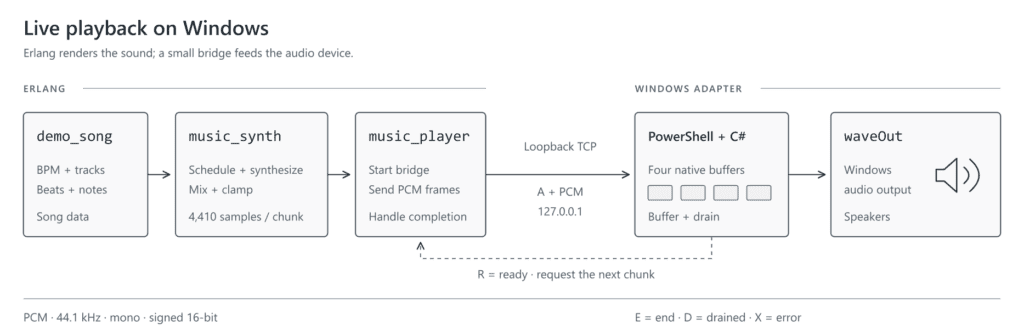
Erlang can calculate the audio portably, but it still needs an operating-system API to make speakers move. music_player.erlchooses a deliberately small adapter: wave_out.ps1 on Windows or audio_out.con macOS.
The synthesizer is platform-neutral; this diagram shows the Windows branch of the final bridge.
The player first calls music_synth:prepare/1 or prepare/2. It then checks the operating system and starts a TCP listener bound to 127.0.0.1 on a temporary port. Binding to loopback keeps this private protocol on the local machine.
Next, open_port/2 launches the selected bridge with the temporary port number. Here an Erlang port manages the external process; the PCM itself travels over the loopback TCP socket. The socket uses Erlang’s {packet, 4} mode, so each message receives a four-byte length prefix and arrives as one binary frame.
The PowerShell script uses Add-Type to compile a small embedded C# class. That class connects back to Erlang and opens the default waveform-audio output device through waveOutOpen. Its declared format matches the renderer: PCM, one channel, 44,100 Hz, 16 bits.
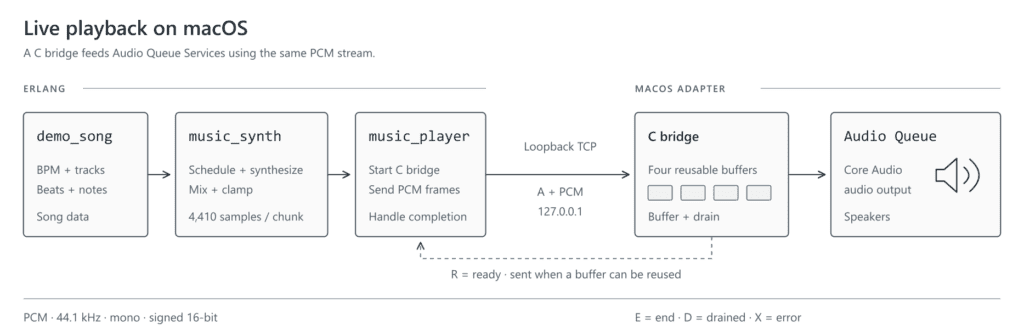
On macOS, run-macos.sh compiles the bundled C bridge with Apple Clang into the ignored _build directory. The bridge connects back to Erlang and creates an output queue with Core Audio’s Audio Queue Services. It declares the same mono, 44,100 Hz, signed 16-bit PCM format, so the Erlang renderer sends identical binaries on both systems.
The macOS bridge uses the same PCM format and request protocol as the Windows bridge.
Four native buffers act as playback slots. For every free slot, the bridge sends an R (“ready”) frame. Erlang responds with A followed by one PCM chunk. When the native API makes a buffer reusable, the bridge requests another. This credit-based exchange prevents Erlang from sending audio faster than the fixed buffer pool can accept it.
When the renderer reaches the end, Erlang sends E. The bridge lets all active buffers drain, replies with D, and closes. An X frame carries a bridge error back to Erlang. The protocol is tiny, but it gives the two runtimes explicit flow control and a clean ending. The macOS bridge asks Audio Queue Services to stop non-immediately and waits for its running-state notification before sending D, so buffered audio is not cut off.
The macOS launcher rebuilds the native bridge when its C source changes. The platform boundary remains music_synth:render/1, which returns either {PCM, NextState} or done. A future Linux adapter could consume those same chunks, handle buffering and errors, and drain at the end without changing the score or synthesizer.
MIDI Is an Authoring Tool, Not the Synthesizer
Writing demo_song.erl by hand is useful for learning, but a complete arrangement can contain thousands of note events. import/import.py converts Standard MIDI files into modules with the same bpm/0 and tracks/0 interface.
Here is the synthesizer playing an imported arrangement, song_01_slay_the_evil. It uses the same instruments as the hand-written demo, with a larger score:
The importer uses only Python’s standard library. It reads MIDI formats 0 and 1, tracks tempo, note-on and note-off events, program changes, chords, and percussion on MIDI channel 10. General MIDI programs are mapped onto the small preset collection rather than reproduced as samples.
You can validate the files in import/input without writing anything:
python3 import/import.py --check
To generate compilable Erlang modules in src, use:
python3 import/import.py --output src
On Windows, use python if that is the name of your Python 3 command.
Existing destinations are skipped unless —overwrite is supplied. Importing is an optional composition workflow; neither Python nor a MIDI parser participates when a song plays. Once generated, a song is simply Erlang source data, and the same mathematical instruments render it.
Equations Become Music
Follow one note and every transformation is visible: a4 becomes MIDI 69, MIDI 69 becomes 440 Hz, 440 Hz drives an oscillator, an envelope shapes its amplitude, voices add together, floats become little-endian integers, and buffered PCM reaches the speakers.
Chiptune began in a world where small sound vocabularies were unavoidable. Recreating that economy in Erlang is a reminder that a musical instrument does not have to be a large framework. Sometimes it can be a few functions, a clock, and 44,100 samples per second.
To hear how much one function matters, change the lead’s saw call to square in music_synth.erl, then run.\run-windows.bat demo_song solo 6 on Windows or ./run-macos.sh demo_song solo 6 on macOS. Keep the notes the same and listen to how the instrument changes. Next, try a longer attack or a shorter release: the score stays familiar while the sound becomes your own.
The Ignite Realtime community is proud to announce that Smack 4.5.0 has been released.
This is a new major release after 4.4 nearly two years ago, with many bug fixes and improvements. Smack’s modular connection architecture is now deemed stable and users of the legacy XMPPTCPConnection should switch over to a modern architecture. The modular connection architecture abstracts the underlying connection mechanism, for example TCP, BOSH, and WebSockets, transporting the raw bytes of the XMPP stream, from the higher level XML layer. This allows, among other things, for a connection to transparently switch between TCP and WebSocket connections.
As always, this new Smack release is available on Maven Central.
Ignite Realtime Blog: FASTer connections for Openfire!
news.movim.eu
/
PlanetJabber
•
15 September 2026
• 1 minute
On mobile (and worse), baseline XMPP is a little more painful than it should be. It has a lot of round-trips, where the client sends a request and waits - patiently - for the answer before it can continue.
Baseline XMPP actually has 9 of these before you can send and receive messages, and while Openfire has dropped some of these for a while (we’ve supported
Direct TLS
, for clients, for ever), others haven’t yet made it here. Silly, as I wrote
SASL2
some time ago, which is a framework for amortising some of the start-up requests into the authentication.
Others are
Bind2
- which pulls resource binding into SASL2 and also allows multiple other “connection setup” things to work - and
FAST
, which hands out tokens to allow reauthentication which is, well, FAST. This gets us down to 4 round-trips - halving connection time.
Thanks to a supporting grant from the NLNet Foundation, these are now all in our “main” branch, and undergoing their final testing before we make a release, so will be in our
nightly builds
from now on. I’ve been lucky enough to spend three weeks doing (sometimes literal!) field testing over slow links, so I’ve seen first hand that fortune really favours the bold with these extensions.
There is also supporting work to make all this happen - like improvements to message archiving, and improvements to our sister project, the
XMPP Interop Testing
framework, so we can do live testing. This is based on
Smack
, so that, too now has SASL2, Bind2, and FAST support in its latest Alpha release, 4.6.0-alpha1.
We’d welcome people trying this code out - it’s a lot of exciting new features, and should be highly beneficial to most users of Openfire, and indeed client developers using Smack. It’s still nightlies, not releases, but we’re keen to move this forward as, erm, FAST as we can.
Yeah, I’m not even sorry.
For other release announcements and news follow us on
Mastodon
or
X