Erlang Solutions: Can Agentic AI Find the Security Vulnerabilities Other Tests Miss?
news.movim.eu
/
PlanetJabber
•
8 October 2026
• 6 minutes
Security teams are good at finding problems. The difficult part is finding the right problems across a growing codebase, a changing application and the connections between them. A scanner can flag a known pattern quickly. A skilled tester can follow a complicated line of enquiry. Neither has unlimited time, and there will always be a question nobody thought to ask.
Could AI agents take on more of that investigative work? I think the answer is yes, provided we are precise about what “find” means. Agents can produce leads, test assumptions and uncover issues that established checks have missed. A security vulnerability, though, has to survive examination in the context of the real system.
That distinction matters more as agents become available to both defenders and attackers. A familiar weakness can become more relevant when agents have the time to find it, test it and follow where it leads. Defenders have a good reason to look again at parts of their systems that were too laborious to examine thoroughly.
What might agents see differently?
Think about the code paths that work perfectly well in normal use but behave differently with a surprising input or an unusual amount of data. Fuzzing (testing software with unexpected or malformed inputs) helps explore these cases; agents can then read the surrounding code, try a more specific hypothesis and keep working through leads that would consume too much of an engineer’s day if checked one by one.
Some issues only become apparent when you understand how the application is used. A finding may look harmless in isolation until you establish who controls the input, which permissions are involved or what the application is meant to prevent. Agents can explore a sequence of actions and check how the application responds at each step, which may reveal a problem that would be hard to spot from an isolated code warning.
There is also the possibility that one weakness opens the way to another. A low-priority issue could expose useful information; a forgotten endpoint might give access to a service assumed to be isolated. Agents can follow a discovery into the next step, although its account of that path still needs to be checked. The full route through a system may matter more than the severity of any one weakness in it.
I would be careful about grouping all of this under one claim that “AI finds what traditional testing misses”. Code analysis tools, fuzzing tools, formal verification and agents conducting a permitted penetration test are doing different jobs. Their findings have different levels of evidence. Formal verification is also starting to gain traction, with code agents proving useful for generating the specifications it requires. The useful question is where agents give the team another line of enquiry and how that enquiry will be validated.
What we found in a mature codebase
We have seen one version of this in our own work. Lukas Backström, a senior developer at Erlang Solutions and a member of the Ericsson Erlang/OTP core development team, built a custom workflow using Claude Code to examine the Erlang/OTP repository for security vulnerabilities, bugs and performance issues.
This codebase already receives human review, regular automated functional and performance testing, and vulnerability scanning. Even so, agents surfaced cases where expensive encoding or decoding could be performed on untrusted data that was very large or unbounded, creating a possible denial-of-service risk. The operation itself was not mysterious. Finding the relevant combination of input and behaviour across a large repository was the challenge.
Our published case study reports approximately 20 previously unknown, potentially severe security vulnerabilities, alongside around 400 critical or high findings and roughly 4,000 findings overall, most of them low-severity bugs. These are reported findings from the investigation, not a claim that thousands of confirmed security vulnerabilities were waiting to be fixed. And, this is one of the world’s most thoroughly tested code bases.
The project gives us evidence for a particular point: agents helped investigate parts of an extensively tested codebase that would have been difficult to cover manually. It does not prove that agents will outperform every scanner or security team. The details of the task and the review process made the result useful.
The part that takes judgement
Lukas gave agents a verification mode, including access to a Docker container to check findings and rank their severity and confidence. He also found that a fresh context and a focused second look at an issue helped expose false positives. That separate work took substantial compute, and the agents still sometimes returned a high-confidence finding that was wrong. It could also mistake a bug for a security issue because it misunderstood the threat model.
An engineer has to ask whether an attacker can reach the relevant code, what input they control, what limits exist elsewhere and what happens in a real deployment. A persuasive explanation from an agent is a reason to investigate, not evidence that every assumption is true.
There is a second challenge once agents start finding more faults. Most teams do not need a larger pile of unverified tickets. They need to know which findings are real and which ones deserve attention first. Every result takes time to assess, and asking agents to assess it again can add to the compute cost. Finding more vulnerabilities only helps if the team has enough context to act on what matters.
The investigative agents must also be secure in its own right. It may read code, retrieve documents and run tools, so its permissions and execution environment deserve scrutiny. Untrusted material could contain instructions intended to redirect its behaviour. The team needs to decide what the agents can access and do before giving it sensitive systems to examine.
Where I would start
I would treat an agentic investigation as an experiment with a clear question, rather than asking agents to “find everything” and judging success by the length of its report:
Choose the gap. Is the team trying to explore unusual code paths, test a business workflow or understand whether separate weaknesses can form an attack path? Set the scope and define what would make a finding meaningful.
Require a trail of evidence. Ask the agents to record what it examined, the assumptions it made and what happened when it tried to verify a concern. Give engineers something they can reproduce.
Review the results against the threat model. Check reachability, exploitability and impact before assigning severity. Give the agents limited access and keep a record of its actions during the investigation.
Measure the whole exercise. Count confirmed issues and the time spent validating them, as well as compute and findings rejected. Compare what the agents found with what existing tests had already revealed.
To conclude
So, can agentic AI find security vulnerabilities other tests miss? Yes, it can uncover leads that existing checks have not surfaced, particularly when an issue takes sustained investigation to find. Our Erlang/OTP work showed that in a codebase with established reviews, automated tests and vulnerability scanning. It was not a test-by-test comparison, so we cannot say which individual check missed each issue.
Finding a lead is only part of the answer. An experienced engineer still needs to establish whether it is a genuine security vulnerability and what should be fixed. The opportunity is to investigate more of the questions a team has never had the time to pursue, then give those findings the scrutiny they deserve.
This release contains fixes for those security issues:
Unauthenticated Remote Code Execution on ejabberd (reported by Gia Bui) when:
ejabberd versions is at least 25.10
BOSH is enabled on any port
S2S is enabled
mod_adhoc_api is loaded
outbound connectivity from ejabberd on ports epmd (default 4369), s2s (default 5269) and Erlang distribution port (dynamically assigned, typically in the range 49152-65535 unless FIREWALL_WINDOW is set in ejabberdctl.cfg).
DoS attack on 16.12+ versions if BOSH is enabled on any port.
Cross-Tenant MUC, Roster and Shared-Roster unauthorized access (reported by Hoang Gia).
Fixed the ordering of some XML child elements
There was a reference-ordering problem in the fast_xml generator, it generated XML encoders that could reorder child elements in a different order from the one declared in the codec specification. From now, the order is the one declared in the codec specification. See details in https://github.com/processone/fast_xml/pull/53
Additionally there was an incorrect sasl2_continue declaration order in the xmpp erlang library: it declared "additional-data, text, tasks". Now it follows the ordering defined in XEP-0388 schema: "additional-data, tasks, text". See details in https://github.com/processone/xmpp/pull/112
New option for CAPTCHA POW
New toplevel option captcha_pow adds a SHA-256 hashcash challenge as described in XEP-0158 in the CAPTCHA form, alongside the image challenge or on its own.
Unlike the image challenge, this does not require setting the option captcha_cmd.
This option is used only by mod_register when registering a new account using In-Band Registration, not in MUC rooms or in mod_register_web. It is disabled by default.
many options modules, for example access_admin option in mod_muc
Consequently, that admin account can administer all of ejabberd: all the global features, all the modules, in all the vhosts... For now let&aposs call it a "global admin".
If you have several vhosts, you can allow specific accounts to administer only specific vhosts. Let&aposs call them "vhost-admins". In this example admin1@localhost can execute commands on all vhosts. Additionally, localhost has a vhost-admin, second has two vhosts-admins, and third has a vhost-admin:
If a vhost-admin tries to execute an API command directed to a vhost he does not administer, or a global command (that has no host argument, and affects all ejabberd), they are rejected:
$ curl --basic --user hostadmin@third:somepass -k \
  &aposhttps://localhost:5443/api/status_num_host?host=third&status=dnd&apos
{"code":32,
 "message":"AccessRules: Account does not have the right to perform the operation.",
 "status":"error"}

$ curl --basic --user hostadmin@third:somepass -k \
  &aposhttps://localhost:5443/api/stats?name=registeredusers&apos
{"code":32,
 "message":"AccessRules: Account does not have the right to perform the operation.",
 "status":"error"}
ChangeLog
Security fixes
Unauthenticated Remote Code Execution on ejabberd
DoS attack on BOSH
Cross-Tenant MUC, Roster and Shared-Roster unauthorized access
Core
Add force value to auth_external_user_exists_check option
ALTER TABLE push_gate CHANGE COLUMN user username text NOT NULL;
CREATE INDEX i_push_gate_username_server_host USING BTREE ON `push_gate`(username(191), server_host(191));
Otherwise:
ALTER TABLE push_gate RENAME COLUMN user TO username;
CREATE INDEX i_push_gate_username USING BTREE ON `push_gate`(username(191));
PgSql
When using multihost schema:
ALTER TABLE push_gate RENAME COLUMN "user" TO "username";
CREATE INDEX i_push_gate_token_server_host ON "push_gate" USING btree ("username", "server_host");
Otherwise:
ALTER TABLE push_gate RENAME COLUMN "user" TO "username";
CREATE INDEX i_push_gate_token ON "push_gate" USING btree ("username");
ejabberd 26.09 download & feedback
As usual, the release is tagged in the Git source code repository on GitHub.
Erlang Solutions: A Live Chiptune Synthesizer in Erlang
news.movim.eu
/
PlanetJabber
•
29 September 2026
• 14 minutes
No sample library — just equations, PCM, and a small OS-specific playback bridge.
Early game consoles had little memory or storage to spare for recorded sound. Their music relied on a small number of voices and a limited vocabulary: simple waveforms, noise, and envelopes. Composers turned those restrictions into instantly recognizable melodies.
Chiptune grew out of these constraints. The term covers a broad family of music and music-making practices rooted in programmable sound chips.
It is often called “8-bit music,” although the label is imprecise: not every chiptune machine was 8-bit, and not every modern track with a retro timbre runs on vintage hardware. The important idea for us is the working method. Instead of asking an audio player to reproduce a recorded instrument, we describe a small signal generator and tell it which frequencies to produce over time. The hardware limitations helped shape the art; today we can choose similar limitations because they are fun.
This project builds a chiptune-inspired synthesizer directly in Erlang. It is not an emulator for a particular console or sound chip. It borrows the useful ingredients—elementary waveforms, noise, short envelopes, and a small set of instruments—and renders them as ordinary digital audio. A bass note is not a WAV file. A kick drum is not a hidden sample. Every instrument is a mathematical function evaluated while the song plays.
The project was inspired in part by the 2020 Erlang Solutions article “The sound of Erlang: How to use Erlang as an instrument”. That article develops sound from first principles, writes raw audio to a file, and plays it with ffplay. We will keep the first-principles spirit but take a different route: multiple simultaneous tracks, several synthesized instruments, chunked rendering, and live playback through the operating system’s audio API.
By the end, you will know how a value such as a4 becomes 440 Hz, how Erlang turns that frequency into signed 16-bit samples, and how those samples reach the speakers.
First, hear the small hand-written demo we will use for the walkthrough. This clip records the synthesizer’s output:
You need Erlang/OTP on PATH, including erl.exe and escript.exe. The playback bridge on Windows uses the powershell.exe and built-in C# compiler available on modern Windows. No FFmpeg, external synthesizer, or audio library is required. Open PowerShell in the repository root and play the small hand-written demo:
.\run-windows.bat demo_song
On macOS, Erlang’s erl and escript commands must be on PATH. The launcher also needs the Apple Command Line Tools to compile the bundled Core Audio bridge. If they are missing, install them with xcode-select --install. Run the equivalent command in Terminal:
./run-macos.sh demo_song
Both launchers compile the application, start a non-interactive Erlang VM, synthesize the song from its Erlang data, and stream it to the default audio output device. They accept any compiled song module with the interface we will examine below.
Before isolating tracks, ask the module what it contains:
Optional Standard MIDI File to Erlang module converter
There are three useful boundaries here. Song modules describe what to play. music_synth calculates what the waveform is. The player and its platform bridge decide how bytes reach an audio device.
A Song Is Erlang Data
A song module exports just two functions. This excerpt shows the tempo and percussion tracks from demo_song:
Each track is {Preset, Events}. A percussion event is simply a beat number. At 120 beats per minute, the kick events above land at beats 0, 2, 4, and so on, while the snare occupies the alternating beats. The closed hat list uses half-beats, which creates the faster pulse running across the demo.
Notes may be one note atom or a non-empty tuple. A tuple schedules its notes together, giving us a chord without a second data structure. Both Beat and Duration are measured in beats and can have whole or fractional values.
The generated song_01_slay_the_evil through song_18_infinite_darkness modules follow exactly the same contract. Their scores are much larger, but they are still ordinary data returned by functions.
The publicmusic module keeps callers away from the internal details:
Track selection happens before synthesis. music_synth:prepare/2 either keeps all tracks, selects one numbered track, or removes the requested track numbers. It then expands the remaining events into voices: one for each sounding note or percussion hit. A chord creates several voices with the same start time.
Walking Through the Player
music_player.erl is intentionally small. Its two public functions first ask the synthesizer to prepare the whole score, then pass the resulting state to open/1:
play(Song) ->
    open(music_synth:prepare(Song)).

play(Song, Selection) ->
    case music_synth:prepare(Song, Selection) of
        {error, _} = Error -> Error;
        Synth -> open(Synth)
    end.
“`
Once prepared, open/1 selects the platform bridge and starts playback. The bridge requests chunks as its audio buffers become available. Sample indexes determine when notes belong in the score; the audio device paces those samples in real time. We will follow the synthesis steps first, then return to the bridge protocol.
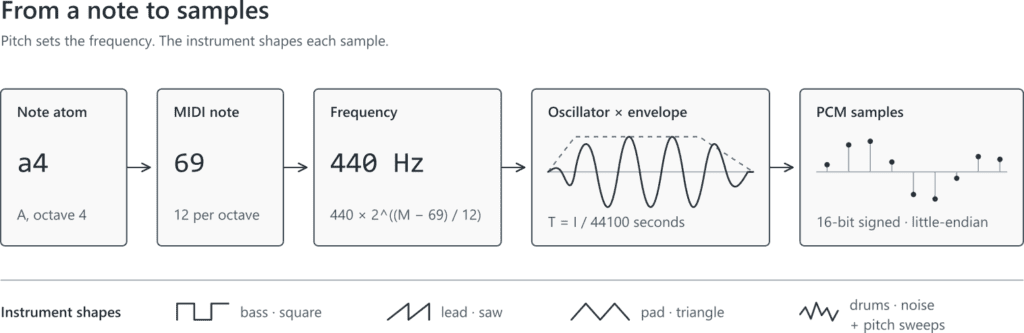
From a Note Name to a Frequency
The note atom a4 becomes MIDI note 69, which corresponds to 440 Hz. In twelve-tone equal temperament, moving one semitone multiplies a frequency by the twelfth root of two. Using A4 as the reference, any MIDI note number Midi can be converted with:
frequency = 440 × 2^((Midi - 69) / 12)
“`
The synthesizer parses atoms such as c4, fs4, and a4, converts the letter, optional s for sharp, and octave into a MIDI number, and applies that formula:
For example, c4 becomes MIDI note 60 and approximately 261.63 Hz.
To turn that frequency into audio, we need samples. Sound is changing air pressure; digital audio represents that change as a sequence of numbers. At 44,100 samples per second, sample index SampleI occurs at time T in seconds:
T = SampleI / 44100
“`
A sine wave of frequency F can be sampled with:
sin(2 × pi × F × T)
“`
The result moves between -1 and 1. Repeating the calculation at consecutive values of T produces the waveform. Higher frequencies complete more cycles per second and sound higher.
A note becomes audio data. Every point in the final waveform is calculated for its position in time.
Instruments Are Functions
The center of the project is the tone/6 family in music_synth.erl. Its clauses are our instruments. Each receives the time since the voice began, its gate duration, its frequency, and where useful the absolute sample index and a deterministic seed. The gate duration is the time the note is held before its release begins; both it and the elapsed time are measured in seconds here.
The melodic presets start with elementary periodic waveforms:
The ?PI2 macro represents 2 × pi. A square wave flips between two levels and gives the bass a hollow, buzzy sound. A sawtooth ramps and jumps, producing the brighter lead. A triangle wave changes more gently and suits the softer pad.
The piano, organ, and strings presets combine basic waveforms. “Piano” adds sine waves at the fundamental, twice the frequency, and three times the frequency, then applies exponential decay. “Organ” uses a related harmonic mixture without the same decay. Strings combine a saw and a slightly detuned triangle. These are impressions, not physical models of real instruments, and their simplicity is part of the chiptune character.
For percussion, the kick feeds a rapidly falling phase into sin and damps it with exp(-9 × T). The tom uses a gentler downward sweep. The snare adds a short 180 Hz body to deterministic pseudo-random noise; the closed hat is an even shorter burst of noise. The cymbal combines noise with a high square wave. A handful of arithmetic expressions becomes a recognizable drum kit.
One more function keeps notes from clicking abruptly at their edges:
envelope(T, _Gate, Attack, _Release) when T < Attack -> T / Attack;
envelope(T, Gate, _Attack, _Release) when T < Gate -> 1.0;
envelope(T, Gate, _Attack, Release) ->
  max(0.0, 1.0 - (T - Gate) / Release).
“`
This is a compact attack–sustain–release envelope. During attack, amplitude rises from zero. It remains at full level while the note is gated, then falls after release begins. Different attack and release values make the same oscillator feel percussive, plucked, or slow and pad-like.
Scheduling, Mixing, and PCM
Tempo determines when each voice begins. beat_sample/2 converts a beat position to an absolute sample index:
Here ?RATE is 44,100. At 120 BPM, one beat lasts half a second, or 22,050 samples; beat 4 begins at sample 88,200.
A pitched event records three positions: Start, the first sample of the note; Gate, the end of its written duration; and End, the end of its release tail. The renderer advances a sample cursor instead of calling timer:sleep/1 for each note. This keeps note positions fixed even if rendering pauses briefly, although playback still needs a steady supply of audio to avoid gaps.
Multiple tracks do not require separate Erlang processes. prepare_tracks/2 gathers all selected tracks into one list of voices. Notes and chords can overlap because voices whose sample ranges intersect are active together.
Preparation turns events into voice tuples containing the preset, start, gate, end, frequency, and seed. Percussion receives a frequency of zero because its formula does not need the pitch argument. Every preset also has a short tail, allowing its release or decay to continue after the gate closes.
The renderer does not allocate the whole song as one giant list. It works in chunks of 4,410 samples—one tenth of a second at 44.1 kHz:
Count = min(?CHUNK, Total - Pos),
Last = Pos + Count,
Active = [V || V = {_, Start, _, End, _, _} <- Voices,
          Start < Last, End > Pos].
“`
Only voices overlapping the current chunk are considered. For each sample index, the renderer evaluates those voices and sums their amplitudes. The sum is scaled and clamped to the valid range from -1 to 1. Clamping prevents an overflowing mix from wrapping into a radically different value, although a heavily clipped mix can still sound distorted.
Finally, each floating-point sample becomes a signed 16-bit little-endian integer:
The resulting binary is mono linear PCM: 44,100 samples per second, two bytes per sample, 88,200 bytes per second. It contains no file header because we are sending it to a device configured with the matching format, not saving a WAV file.
Playback on Windows and macOS
Erlang can calculate the audio portably, but it still needs an operating-system API to make speakers move. music_player.erlchooses a deliberately small adapter: wave_out.ps1 on Windows or audio_out.con macOS.
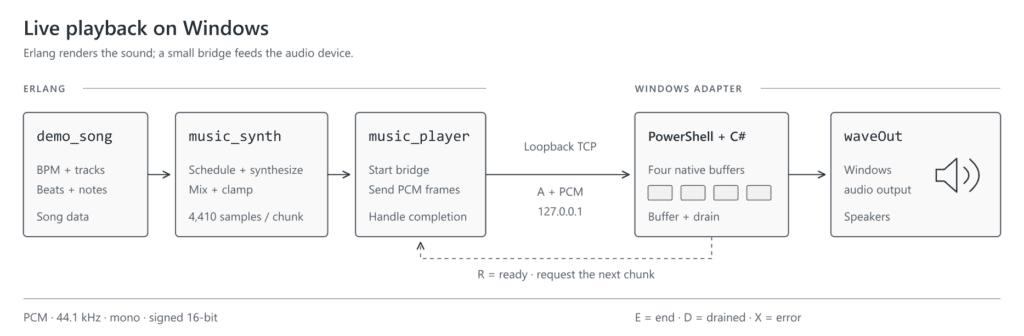
The synthesizer is platform-neutral; this diagram shows the Windows branch of the final bridge.
The player first calls music_synth:prepare/1 or prepare/2. It then checks the operating system and starts a TCP listener bound to 127.0.0.1 on a temporary port. Binding to loopback keeps this private protocol on the local machine.
Next, open_port/2 launches the selected bridge with the temporary port number. Here an Erlang port manages the external process; the PCM itself travels over the loopback TCP socket. The socket uses Erlang’s {packet, 4} mode, so each message receives a four-byte length prefix and arrives as one binary frame.
The PowerShell script uses Add-Type to compile a small embedded C# class. That class connects back to Erlang and opens the default waveform-audio output device through waveOutOpen. Its declared format matches the renderer: PCM, one channel, 44,100 Hz, 16 bits.
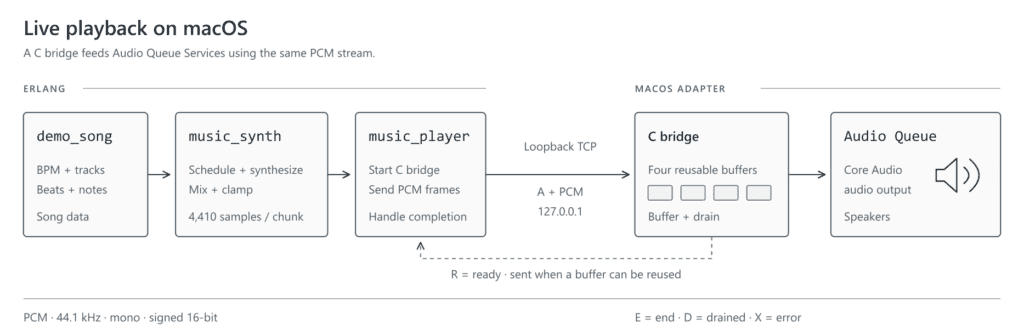
On macOS, run-macos.sh compiles the bundled C bridge with Apple Clang into the ignored _build directory. The bridge connects back to Erlang and creates an output queue with Core Audio’s Audio Queue Services. It declares the same mono, 44,100 Hz, signed 16-bit PCM format, so the Erlang renderer sends identical binaries on both systems.
The macOS bridge uses the same PCM format and request protocol as the Windows bridge.
Four native buffers act as playback slots. For every free slot, the bridge sends an R (“ready”) frame. Erlang responds with A followed by one PCM chunk. When the native API makes a buffer reusable, the bridge requests another. This credit-based exchange prevents Erlang from sending audio faster than the fixed buffer pool can accept it.
When the renderer reaches the end, Erlang sends E. The bridge lets all active buffers drain, replies with D, and closes. An X frame carries a bridge error back to Erlang. The protocol is tiny, but it gives the two runtimes explicit flow control and a clean ending. The macOS bridge asks Audio Queue Services to stop non-immediately and waits for its running-state notification before sending D, so buffered audio is not cut off.
The macOS launcher rebuilds the native bridge when its C source changes. The platform boundary remains music_synth:render/1, which returns either {PCM, NextState} or done. A future Linux adapter could consume those same chunks, handle buffering and errors, and drain at the end without changing the score or synthesizer.
MIDI Is an Authoring Tool, Not the Synthesizer
Writing demo_song.erl by hand is useful for learning, but a complete arrangement can contain thousands of note events. import/import.py converts Standard MIDI files into modules with the same bpm/0 and tracks/0 interface.
Here is the synthesizer playing an imported arrangement, song_01_slay_the_evil. It uses the same instruments as the hand-written demo, with a larger score:
The importer uses only Python’s standard library. It reads MIDI formats 0 and 1, tracks tempo, note-on and note-off events, program changes, chords, and percussion on MIDI channel 10. General MIDI programs are mapped onto the small preset collection rather than reproduced as samples.
You can validate the files in import/input without writing anything:
python3 import/import.py --check
To generate compilable Erlang modules in src, use:
python3 import/import.py --output src
On Windows, use python if that is the name of your Python 3 command.
Existing destinations are skipped unless —overwrite is supplied. Importing is an optional composition workflow; neither Python nor a MIDI parser participates when a song plays. Once generated, a song is simply Erlang source data, and the same mathematical instruments render it.
Equations Become Music
Follow one note and every transformation is visible: a4 becomes MIDI 69, MIDI 69 becomes 440 Hz, 440 Hz drives an oscillator, an envelope shapes its amplitude, voices add together, floats become little-endian integers, and buffered PCM reaches the speakers.
Chiptune began in a world where small sound vocabularies were unavoidable. Recreating that economy in Erlang is a reminder that a musical instrument does not have to be a large framework. Sometimes it can be a few functions, a clock, and 44,100 samples per second.
To hear how much one function matters, change the lead’s saw call to square in music_synth.erl, then run.\run-windows.bat demo_song solo 6 on Windows or ./run-macos.sh demo_song solo 6 on macOS. Keep the notes the same and listen to how the instrument changes. Next, try a longer attack or a shorter release: the score stays familiar while the sound becomes your own.
The Ignite Realtime community is proud to announce that Smack 4.5.0 has been released.
This is a new major release after 4.4 nearly two years ago, with many bug fixes and improvements. Smack’s modular connection architecture is now deemed stable and users of the legacy XMPPTCPConnection should switch over to a modern architecture. The modular connection architecture abstracts the underlying connection mechanism, for example TCP, BOSH, and WebSockets, transporting the raw bytes of the XMPP stream, from the higher level XML layer. This allows, among other things, for a connection to transparently switch between TCP and WebSocket connections.
As always, this new Smack release is available on Maven Central.
Ignite Realtime Blog: FASTer connections for Openfire!
news.movim.eu
/
PlanetJabber
•
15 September 2026
• 1 minute
On mobile (and worse), baseline XMPP is a little more painful than it should be. It has a lot of round-trips, where the client sends a request and waits - patiently - for the answer before it can continue.
Baseline XMPP actually has 9 of these before you can send and receive messages, and while Openfire has dropped some of these for a while (we’ve supported
Direct TLS
, for clients, for ever), others haven’t yet made it here. Silly, as I wrote
SASL2
some time ago, which is a framework for amortising some of the start-up requests into the authentication.
Others are
Bind2
- which pulls resource binding into SASL2 and also allows multiple other “connection setup” things to work - and
FAST
, which hands out tokens to allow reauthentication which is, well, FAST. This gets us down to 4 round-trips - halving connection time.
Thanks to a supporting grant from the NLNet Foundation, these are now all in our “main” branch, and undergoing their final testing before we make a release, so will be in our
nightly builds
from now on. I’ve been lucky enough to spend three weeks doing (sometimes literal!) field testing over slow links, so I’ve seen first hand that fortune really favours the bold with these extensions.
There is also supporting work to make all this happen - like improvements to message archiving, and improvements to our sister project, the
XMPP Interop Testing
framework, so we can do live testing. This is based on
Smack
, so that, too now has SASL2, Bind2, and FAST support in its latest Alpha release, 4.6.0-alpha1.
We’d welcome people trying this code out - it’s a lot of exciting new features, and should be highly beneficial to most users of Openfire, and indeed client developers using Smack. It’s still nightlies, not releases, but we’re keen to move this forward as, erm, FAST as we can.
Yeah, I’m not even sorry.
For other release announcements and news follow us on
Mastodon
or
X
news.movim.eu
/
PlanetJabber
•
15 September 2026
• 1 minute
Earlier today, version 1.8.0 has been released. This release adds tests for exciting new XMPP functionality!
Classic XMPP connection setup takes a lot of round-trips: authenticate, bind a resource, enable carbons, kick off
stream management, sync the archive. Each one is its own request. Fine on wifi, annoying on a shaky mobile connection.
XMPP offers various XEPs to fix that. SASL2 (XEP-0388) turns authentication
into a single extensible envelope instead of a fixed sequence of steps, and everything else here builds on it.
Bind 2 (XEP-0386) folds resource binding and feature enablement into that
same envelope, so a client can walk away with a fully set-up session in (almost) one shot. And
FAST (XEP-0484) lets a client swap its password for a short-lived, rotating
token and reconnect to the server, authenticated, in a single round-trip, no SCRAM handshake required.
Put together, a client can go from opening a socket to fully authenticated and ready to send in essentially one
round-trip. That’s also exactly the kind of multi-XEP choreography where servers tend to disagree on the details, so
we’re glad to have it covered.
Give the new tests a try, and let us know what you find!
Just like any other product or project by the XSF, the Newsletter is the result of the voluntary work of its members and contributors. If you are happy with the services and software you may be using, please consider saying thanks or help these projects!
There will be an XMPP stand at the LinuxDays conference in Prague during the first weekend of October. You can also vote for XMPP-related lectures during the first week of September.
Tubercule, a collective of hackers and hackerettes from the Rennes region (France) that wants to be inclusive and accessible, announced the availability of their newly implemented XMPP instance for those of you in Rennes or around! The announcement came along with a really handy guide (which will evolve over time), that also adds plain and simple instructions on how to get in touch with them and get an account. Have fun! [FR]
Software news
Clients and applications
aTalk has released version 6.5.0 of its encrypted instant messaging with video call and GPS features for Android. This release brings a lot of improvements, quite a few fixes and some really heavy work ‘under the hood’. Please refer to the release notes for all the details.
Gajim has released version 2.6.0 of its free and fully featured chat app for XMPP. Gajim now adapts responsively to window size changes. This release comes with many small improvements and bugfixes. Thank you for all your contributions!
Introducing Mynah: an XMPP client using Python, GTK, and slixmpp. It has a long-term vision of being maximally customisable, user-friendly, and cross-platform (Linux, Windows, macOS).
Monocles has released version 2.3 of its chat client for Android. This is a bigger release that brings in a lot of new features like multi file messages, a new global search, group calls (still in beta stage), several UI/UX improvements and some ground breaking ones as Post Quantum OMEMO2, along with updated translations, a whole lot of fixes and more! Note: due to some delays with the Play Store updates, this release is only available through F-droid for the time being.
Servers
MongooseIM has released versions 6.8.0 and 6.8.1 of their enterprise instant messaging solution. You can read all the details in the changelog.
The Ignite Realtime community is pleased to announce the release of Openfire 5.1.2, a maintenance update to the open-source XMPP real-time communication server. Head over to the full changelog for all the details!
The Prosody App for Yunohost has been updated to provide a configuration panel, to give an easy access to the most relevant parameters from the web interface!
Enthusiasts from New Zealand announced a new local XMPP server for “Kiwis”: xmpp.nz
Libraries & Tools
Introducing xmpp-translate-bot, a translation bot for XMPP (MUC) that makes use of a self-hosted LibreTranslate instance as a backend for language detection and translation. [PT_BR]
libomemo.js, a TypeScript implementation of the OMEMO Multi-End Message and Object Encryption protocol for XMPP, version 3.0.0 has been released. Once again, the list of changes is larger and has more details and notices on breaking changes that what could mention in here. Please refer to the full changelog for all the details.
python-nbxmpp, a Python library that provides a way for Python applications to use the XMPP network, version 7.4.0 has been released. Full details on the changelog.
xmpp-dns, a CLI tool to check XMPP SRV records, version 0.6.4 has been released. Full details on the changelog.
Extensions and specifications
The XMPP Standards Foundation develops extensions to XMPP in its XEP series in addition to XMPP RFCs. Developers and other standards experts from around the world collaborate on these extensions, developing new specifications for emerging practices, and refining existing ways of doing things. Proposed by anybody, the particularly successful ones end up as Final or Active - depending on their type - while others are carefully archived as Deferred. This life cycle is described in XEP-0001, which contains the formal and canonical definitions for the types, states, and processes. Read more about the standards process. Communication around Standards and Extensions happens in the Standards Mailing List (online archive).
Proposed
The XEP development process starts by writing up an idea and submitting it to the XMPP Editor. Within two weeks, the Council decides whether to accept this proposal as an Experimental XEP.
Accepted as Experimental by council vote on 2026-07-07 (XEP Editor(dg))
Deferred
If an experimental XEP is not updated for more than twelve months, it will be moved off Experimental to Deferred. If there is another update, it will put the XEP back onto Experimental.
Fix inconsistent hash in the example with multiple data sources for the same file. (nc)
Version 1.1.0 of XEP-0490 (Message Displayed Synchronization)
Add security consideration for sender verification of PEP notifications. (dg)
Version 0.1.1 of XEP-0515 (TLS Channel-Binding Downgrade Protection)
Fixed typo in Bind 2 namespace (XEP Editor (dg))
Last Call
Last calls are issued once everyone seems satisfied with the current XEP status. After the Council decides whether the XEP seems ready, the XMPP Editor issues a Last Call for comments. The feedback gathered during the Last Call can help improve the XEP before returning it to the Council for advancement to Stable.
Looking for job offers or want to hire a professional consultant for your XMPP project? Visit our XMPP job board.
Newsletter Contributors & Translations
This is a community effort, and we would like to thank translators for their contributions. Volunteers and more languages are welcome! Translations of the XMPP Newsletter will be released here (with some delay):
Contributors:
To this issue: cal0pteryx, emus, Gonzalo Raúl Nemmi, Ludovic Bocquet, poVoq, XSF iTeam
This XMPP Newsletter is produced collaboratively by the XMPP community. Each month’s newsletter issue is drafted in this simple pad. At the end of each month, the pad’s content is merged into the XSF GitHub repository. We are always happy to welcome contributors. Do not hesitate to join the discussion in our XSF Communications Team group chat (MUC) and thereby help us sustain this as a community effort. You have a project and want to spread the news? Please consider sharing your news or events here, and promote it to a large audience.
Tasks we do on a regular basis:
gathering news in the XMPP universe
short summaries of news and events
summary of the monthly communication on extensions (XEPs)
review of the newsletter draft
preparation of media images
translations
communication via media accounts
Unsubscribe from the XMPP Newsletter
For this newsletter either log in here and unsubscribe or simply send an email to newsletter-leave@xmpp.org.
(If you have not previously logged in, you may need to set up an account with the appropriate email address.)
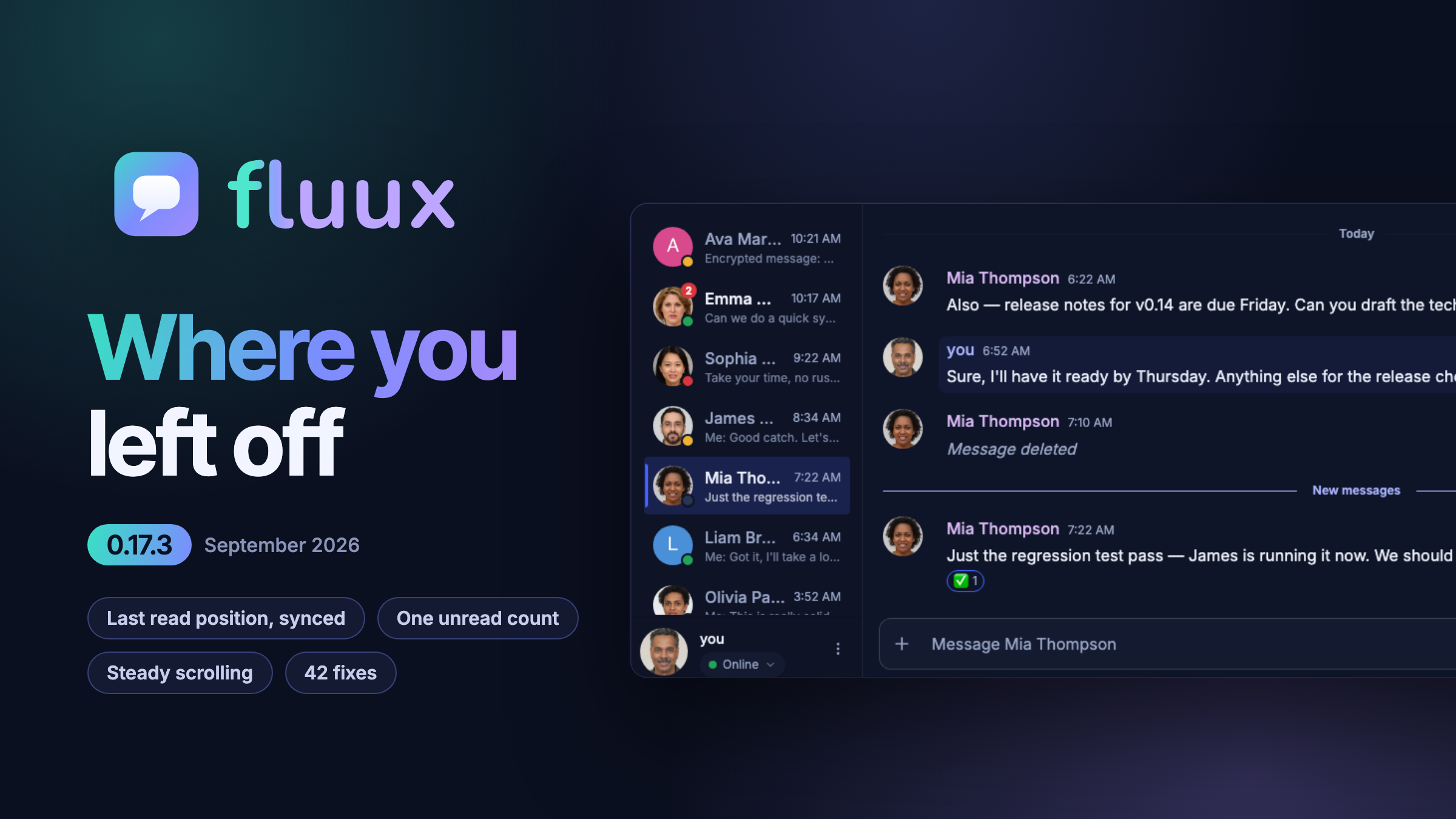
ProcessOne: Fluux Messenger 0.17.3: your last read position everywhere, and unread counts you can trust
news.movim.eu
/
PlanetJabber
•
10 September 2026
• 5 minutes
The largest single piece of that work is where you stopped reading, and how Fluux shares that position with your other clients. The rest is spread thin on purpose: badges that would not clear, a "New messages" line that kept coming back, a conversation that moved while you were reading it, failures that never said why.
Where you left off, on every client
Every XMPP client on your account should agree on where you stopped reading. Fluux publishes that position with XEP-0490, and this release closes the cases where the publication used to stall.
Your read position now leaves the device in the cases where it used to get stuck
: after you reply in a one-to-one chat, in a conversation with nothing currently loaded, and after a first attempt that did not go through. Your other clients stop showing a stale "New messages" line and an inflated badge.
A position arriving from another client is no longer dropped
when Fluux cannot yet place it in its own history. It is kept and applied the moment you open the conversation.
A conversation whose oldest messages have aged out of the server archive no longer freezes your position.
Fluux could stop publishing that conversation altogether, which left your other clients months behind.
A group chat you read elsewhere now shows what your other clients show
, instead of sitting at zero unread with no read marker while they display both.
One unread count, everywhere it appears
There used to be more than one way to answer "how many messages are unread here", and the answers could disagree. Now there is one: the messages that sit after your last read position. Every surface that shows a number reads that same number.
The sidebar badge, the "New messages" divider, the floating pill and the scroll-to-bottom badge always agree.
A conversation left in the background no longer under-counts, and opening a conversation no longer zeroes its badge before you have read anything.
The divider stays where it is while you are looking at it.
It no longer reappears every time you reopen a conversation you have already read to the end.
A badge that reading could not clear is gone.
Your read position also stops moving backwards when the last message you read is missing from the loaded history.
Rooms say more at a glance
: a room row now tells you how many messages are unread, and the unread dot and the mention badge moved after the timestamp so they line up down the list.
A conversation that stays where you put it
Scrolling is how you navigate a conversation. It should never happen on its own.
Closing an image or a dialog with Escape keeps your place.
A late-arriving older message no longer pushes a scrolled-up reader backwards in time either.
Returning to a room lands where you left it.
Opening a room whose read position predates the loaded history no longer strands you at the oldest message, and Home works immediately after opening a conversation.
The view stays on the newest message
when a late link preview, reaction or attachment makes the last message taller, and when the composer collapses back to one line after you send.
The typing indicator no longer covers messages.
Its label wraps to a second line instead of being cut off.
When something fails, Fluux tells you
Silence is the worst answer an app can give.
Older messages that could not be loaded
now show a marker, right above the button that tries again.
A bookmarked room that could not be rejoined says why
: the room wants a password, or your nickname is already taken by somebody else in it, or it only admits members. Joining a password-protected room asks for the password wherever you join from, the sidebar, an invitation or Browse Rooms, and remembers it for next time.
A message that cannot be read explains which problem it hit
: a key this device does not have, an invalid signature, or content that could not be parsed, instead of always blaming a missing key.
Opening a conversation shows a loading indicator and lets you go back
while history loads, and an update that has to upgrade your local history shows a progress bar while it does.
Faster catch-up
Launching after a long absence and opening a conversation are both faster.
Fluux writes far less to local storage while it catches up on history, and upgrading local history after an update is faster too, on large archives especially.
Group chat history no longer arrives in two visible phases
on mobile and in the browser. After a reconnect, a joined room no longer sits inert in the sidebar with no preview and no timestamp.
A busy room you join no longer announces its recent history as new arrivals.
Encryption, desktop, and the rest
OpenPGP interoperability
: keys generated by Fluux can now be imported by Gajim, existing keys are repaired when you unlock them, and Fluux no longer removes your other clients&apos keys from your published key list. Saving an image from the lightbox no longer writes the raw encrypted file to disk, and re-publishing an unchanged key no longer locks encryption behind a warning.
A system tray on Windows and Linux
: a new setting decides whether closing the window quits Fluux or leaves it running in the tray, wherever the desktop provides one. Clicking a notification restores the window and opens the conversation and the message it came from, and on Linux the notification settings button now opens the right panel on Cinnamon, KDE, XFCE, Budgie and LXQt.
Connections that used to be refused
: Fluux now asks your server where to connect before falling back to its own list of known addresses, so an account on a server whose address changed is no longer locked out. A password with accented or non-Latin characters is sent exactly as you typed it, so accounts that were rejected with "invalid username or password" can sign in. If you were affected and typed an address into the advanced server field, clear it once and Fluux will find the server on its own.
Korean, strikethrough, and the small things
: Korean joins the interface languages, contributed by the community. Markdown strikethrough renders alongside the XEP-0393 form. A deleted message stays deleted everywhere Fluux summarises a conversation, relative dates update after midnight even when the app stays open overnight, and copying several messages at once no longer drops polls and attachments.
Get it
Fluux Messenger 0.17.3 is available for macOS, Windows and Linux, or directly in your browser, from the
Fluux Messenger page
. If you upgrade and something still feels off, tell us: bug reports and feature requests both go to
GitHub Issues
.
Erlang Solutions: Implementing a Phoenix PubSub Adapter with EventStore
news.movim.eu
/
PlanetJabber
•
10 September 2026
• 6 minutes
Distributed systems need async message delivery across nodes. Phoenix provides
Phoenix PubSub
for this, with pluggable adapters for different backends — officially PG2 and Redis.
This post walks through implementing a Phoenix PubSub adapter backed by
EventStore
, an Elixir event sourcing library that persists events to PostgreSQL as an append-only log.
Using EventStore as a PubSub backend has a few advantages over the default PG2 adapter:
No Erlang distribution required
: nodes communicate through the shared database rather than through the Erlang cluster, so you can run multiple nodes without configuring Erlang node connectivity.
Persistence
: every broadcast is stored and can be replayed or audited later.
The tradeoffs are the need for storage and the additional latency of a database round-trip per broadcast, making it best suited for lower-throughput messaging where persistence and cross-node decoupling matter more than raw speed. This implementation is a proof of concept — no load tests were performed.
A full implementation of the adapter can be found
on Github
.
Generates the child spec for the adapter. GenServer provides a default; this rarely needs overriding.
broadcast(adapter_name,topic,message,dispatcher)
Called when a message is broadcast through
Phoenix.PubSub.broadcast
. The
adapter_name
is the PubSub name with
.Adapter
appended (e.g.
MyApp.PubSub → MyApp.PubSub.Adapter
). The
dispatcher
module handles local delivery via
dispatch/3
.
Same as
broadcast/4
with an additional
node_name
— the message should only reach subscribers on that node.
The EventStore adapter
This section walks through a possible implementation of a Phoenix PubSub adapter that uses EventStore to distribute messages between nodes. This gives a solution that does not depend on Erlang/Elixir distribution, and an event log is stored in case further analysis is needed.
How Phoenix.PubSub works
Phoenix.PubSub uses Elixir’s
Registry
for subscriptions — each
subscribe
call registers an entry under the topic key. When
broadcast
is called, the framework invokes the adapter callback to distribute the message, then handles local dispatch.
The adapter’s job is to get the message to other nodes. For
direct_broadcast
, only subscribers on the target node should receive it.
The implementation
The adapter is a GenServer that joins the PubSub supervision tree. An
eventstore
option selects which EventStore module to use (in case you have multiple):
The GenServer stores the EventStore module and the PubSub name in state — both are needed later:
defmodulePhoenix.PubSub.EventStoredo@behaviourPhoenix.PubSub.AdapteruseGenServerdefstart_link(opts)doGenServer.start_link(__MODULE__,opts,name:opts[:adapter_name])
enddefinit(opts)do{:ok,
%{
eventstore:opts[:eventstore],
pubsub_name:opts[:name]
}}
end#... implementation will come here ...#end
Note the difference between
opts[:name]
and
opts[:adapter_name]
. The former is the name of the PubSub as a whole and is reserved for the Registry. Publishers use it when broadcasting messages.
opts[:adapter_name]
can be used as the name of the GenServer.
Distributing a message as an event
The GenServer appends a new event to the EventStore when
broadcast
is called:
defbroadcast(server,topic,message,dispatcher,metadata\\%{})dometadata=Map.put(metadata,:dispatcher,dispatcher)
GenServer.call(server,{:broadcast,topic,message,metadata})
enddefhandle_call(
{:broadcast,topic,message,metadata},
_from_pid,
%{id:id,eventstore:eventstore,serializer:serializer,pubsub_name:pubsub_name}=state
)doevent=%EventStore.EventData{
# ... constructed below}
res=eventstore.append_to_stream(topic,:any_version,[event])
# For direct_broadcast targeting the current node, the framework does not# call local dispatch, so the adapter must do it. For regular broadcast,# the framework handles local dispatch after adapter.broadcast returns :ok.current_node=to_string(node())
destination_node=Map.get(metadata,:destination_node)
ifdestination_node==current_nodedodispatcher=Map.get(metadata,:dispatcher,Phoenix.PubSub)
Phoenix.PubSub.local_broadcast(pubsub_name,topic,message,dispatcher)
end{:reply,res,state}
end
direct_broadcast/5
is a thin wrapper that sets
destination_node
in the metadata before delegating to
broadcast/5
:
defdirect_broadcast(server,node_name,topic,message,dispatcher)dometadata=%{
destination_node:to_string(node_name),
source_node:to_string(node())
}
broadcast(server,topic,message,dispatcher,metadata)
end
source_node
is stored in the event metadata for auditing. Routing is handled downstream by comparing
destination_node
against the current node.
The key decision is how to wrap the message inside
%EventStore.EventData{}
. Serialization is handled by a pluggable module (defaulting to
Phoenix.PubSub.EventStore.Serializer.Base64
) so the adapter is not tied to a specific encoding. The default serializer base64-encodes
:erlang.term_to_binary/
1 output — this is necessary because EventStore stores data as JSON and raw binaries would be invalid, and because JSON cannot distinguish atoms from strings so a round-trip through term serialization preserves type fidelity.
A custom serializer can be provided via the
serializer
option as long as it implements
serialize/1
and
deserialize/1
.
Handling events, local distribution
Now that events are in the event store, any subscribed process will receive them. The GenServer must subscribe to all topics (
"$all"
). If the event store is also used for another purpose, it’s best to have a separate one for PubSub. The subscription is set up via
handle_continue/2
, which runs immediately after
init/1
completes, before any other messages can be processed.
A transient subscription is used since previous messages are not needed. The event store replies with a {
:subscribed, subscription
} message, which must also be handled. After this, the server will start receiving {
:events, events
} messages.
To avoid dispatching a local message twice (once from
broadcast
and once when the event arrives back from EventStore), a unique ID is added to the process state:
definit(opts)do{:ok,
%{
id:generate_unique_id(opts),
eventstore:opts[:eventstore],
pubsub_name:opts[:name],
serializer:opts[:serializer]||Phoenix.PubSub.EventStore.Serializer.Base64},{:continue,:subscribe}}
enddefpgenerate_unique_id(opts)dounique_id_fn=opts[:unique_id_fn]||fn_name->UUID.uuid4()endunique_id_fn.(opts[:name])
end
A custom ID generator can be provided via
unique_id_fn
— a function that receives the PubSub name and returns a unique string. Useful when UUID is unavailable or when a deterministic ID is needed for testing.
The
id
is added to the event’s metadata field as
source_id
, keeping it separate from the message data. Serialization is delegated to the configurable
serializer
module. The
handle_call
for
:broadcast
becomes:
Where the value of id and
serializer
come from the state, and
metadata
already contains
dispatcher
and any
destination_node
for direct broadcasts. When an event arrives back,
source_id
identifies the origin node so duplicates can be skipped:
That’s it — a complete implementation of Phoenix PubSub using EventStore, including support for
direct_broadcast
via the
destination_node
metadata field and pluggable serialization.